
Appearance
Starter attribute pack
The Entity Config wizard can generate three project-owned schema assets containing a small, coherent authoring baseline. The pack demonstrates resource values, maxima, signed rates, normalized chances, raw ratings, and multipliers without making any name or formula mandatory.
Existing configured schemas are always reused without modification. The tables below apply only when the wizard creates a missing schema.
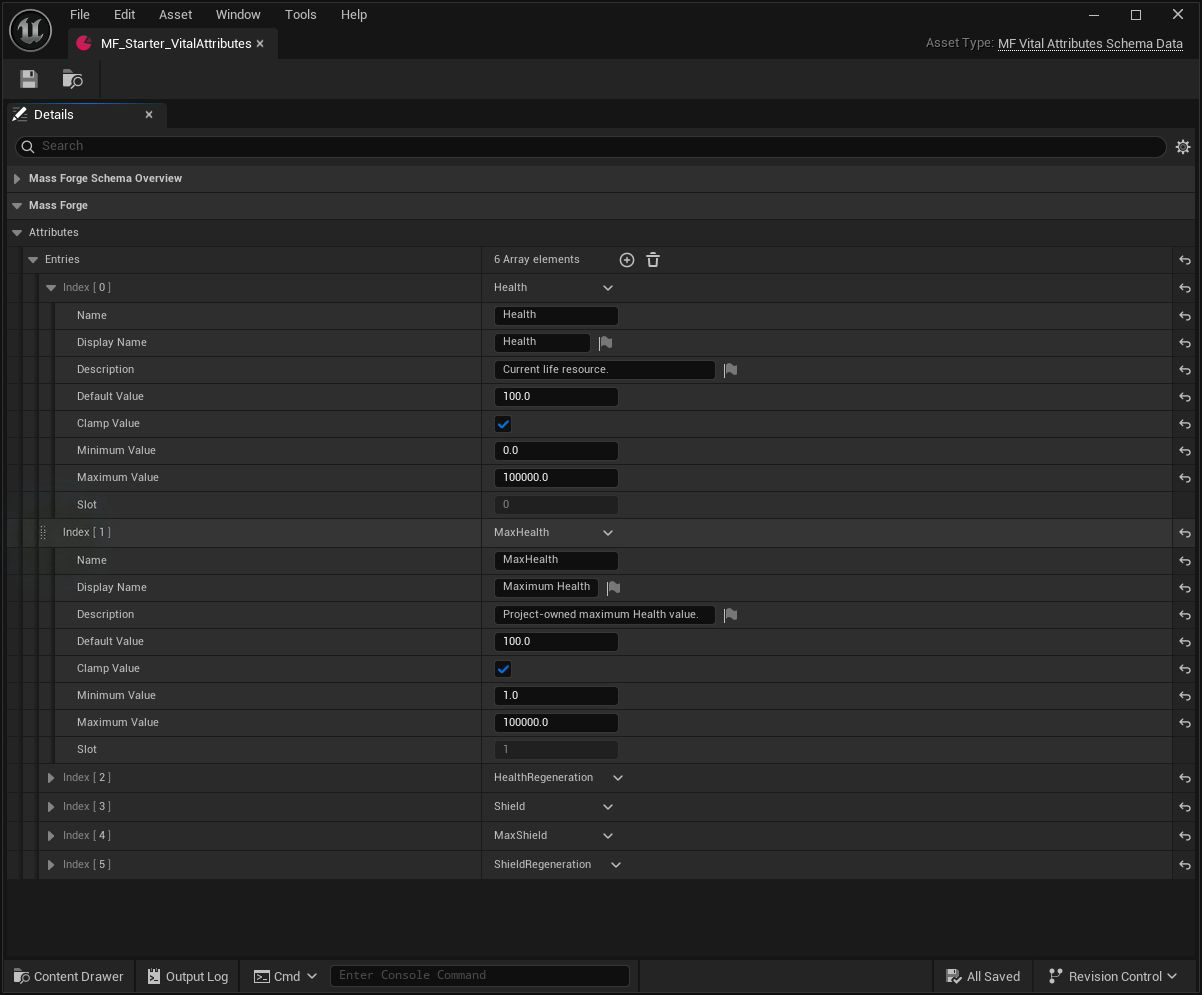
The starter pack is editable project Content. Use the shown defaults and bounds as a baseline, then change them to the units and balance of the game before saves ship.
Vital domain
| Attribute | Meaning | Default | Initial bounds |
|---|---|---|---|
| Health | Current life resource | 100 | 0–100,000 |
| MaxHealth | Project-owned Health capacity | 100 | 1–100,000 |
| HealthRegeneration | Signed Health change per second | 0 | -100,000–100,000 |
| Shield | Current absorbable protection resource | 0 | 0–100,000 |
| MaxShield | Project-owned Shield capacity | 100 | 0–100,000 |
| ShieldRegeneration | Signed Shield change per second | 0 | -100,000–100,000 |
Health and Shield are current resources. Their Max partners are ordinary attributes; Mass Forge does not silently bind a current value to its maximum. Use a Derived Attribute profile, effect, or project rule when a project wants that relationship.
The regeneration attributes are signed rates. A positive value can drive regeneration and a negative value can drive degeneration. A Regeneration Profile decides which target samples which rate and at what interval; merely owning a rate attribute does not activate processing.
Combat domain
| Attribute | Meaning | Default | Initial bounds |
|---|---|---|---|
| AttackPower | Raw source power rating | 10 | 0–100,000 |
| Defense | Raw mitigation rating | 0 | 0–100,000 |
| ArmorPenetration | Raw penetration rating | 0 | 0–100,000 |
| CriticalChance | Normalized probability | 0.05 | 0–1 |
| CriticalMultiplier | Damage multiplier | 1.5 | 1–100 |
| Accuracy | Normalized project hit-chance input | 1 | 0–1 |
| Evasion | Normalized project avoidance input | 0 | 0–1 |
Raw ratings do not imply a formula. A Damage Definition may use AttackPower and Defense directly, while the caller may derive request penetration from ArmorPenetration. Accuracy and Evasion are supplied as common normalized inputs for project targeting or policy code; the stock damage calculation does not roll hit chance.
CriticalChance is a fraction, not a percentage point value: 0.25 means 25%. CriticalMultiplier is a multiplier: 1.5 means 150% of pre-critical damage. Damage requests provide their deterministic critical roll explicitly.
Support domain
| Attribute | Meaning | Default | Initial bounds |
|---|---|---|---|
| Mana | Current ability resource | 100 | 0–100,000 |
| MaxMana | Project-owned Mana capacity | 100 | 1–100,000 |
| ManaRegeneration | Signed Mana change per second | 0 | -100,000–100,000 |
| Stamina | Current action resource | 100 | 0–100,000 |
| MaxStamina | Project-owned Stamina capacity | 100 | 1–100,000 |
| StaminaRegeneration | Signed Stamina change per second | 0 | -100,000–100,000 |
| MoveSpeed | Project-owned movement-speed value | 600 | 0–100,000 |
| CooldownRate | Project-owned cooldown-speed multiplier | 1 | 0.01–100 |
Mana and Stamina are current resources suitable for ability costs and Instant Effects. MoveSpeed intentionally has no assumed Unreal movement-unit conversion. CooldownRate uses 1 as its neutral multiplier, but Mass Forge does not automatically scale cooldowns from it; the project decides where and how that input participates.
Safe customization
Before the first shipped save, edit, replace, or remove any starter entry freely. Keep every name unique within its domain, preserve unique in-range slots, use finite defaults/bounds, and run the schema overview plus Project Health after changes.
After saves have shipped, an attribute's domain and name are persistent identity. Slot repair does not change identity, but a rename or domain move requires an explicit schema migration.
Rename example
Suppose released schema version 1 used Vital.MaxHealth, and version 2 should call it Vital.HealthCapacity:
- Rename the schema entry to
HealthCapacitywhile keeping a valid unique slot. - Create a Mass Forge Attribute Snapshot Migration with stable ID
Migration.Attributes.1To2. - Set Source Schema Version to
1and Target Schema Version to2. - Add one Rename or Move rule from
Vital.MaxHealthtoVital.HealthCapacity. - Set Snapshot Schema Version to
2and keep Oldest Supported Snapshot Schema Version at1while version-1 saves remain supported. - Run Project Health and confirm a complete migration path.
- During load, call Migrate Mass Forge Attribute Snapshot before Restore Mass Forge Attribute Snapshot.
Migration changes identity without scaling or reinterpreting the saved float. If units change, perform the project-specific numeric conversion in the surrounding SaveGame upgrade before restore.
Suggested first uses
- Configure a Damage Definition with
Vital.Health, optionalVital.Shield,Combat.AttackPower, andCombat.Defense. - Configure a Regeneration Profile targeting
Vital.Healthand samplingVital.HealthRegenerationwith scale1. - Author a self-heal ability that spends
Support.Manaand applies a positiveVital.HealthInstant Effect. - Use Accuracy, Evasion, ArmorPenetration, MoveSpeed, and CooldownRate only in project rules that state their units and formula explicitly.
See the Blueprint-only quick start, schema editor guide, regeneration guide, damage guide, and persistence guide for the related workflows.