
Appearance
Blueprint authoring guide
Mass Forge exposes the same runtime capabilities through context-sensitive Blueprint libraries and directly through its world subsystems. The convenience nodes are the recommended starting point: they obtain the correct subsystem from the hidden world-context pin and return the same detailed result structures as the lower-level API.
New users should begin with the Blueprint-only quick start, which connects installation, the Entity Config wizard, first attribute access, damage, healing, one ability, and player↔Mass adapters into one end-to-end walkthrough. When the desired gameplay result is known but the correct asset or node is not, use the task-oriented Blueprint recipe index.
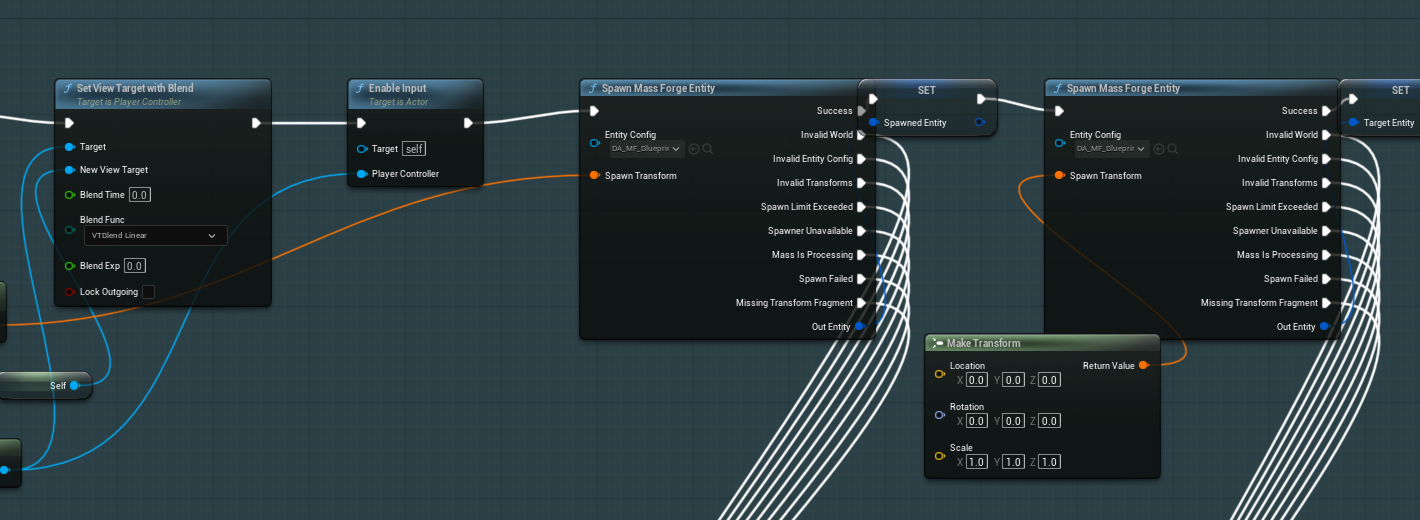
Mass Forge Blueprint graphs use explicit success/failure execution pins and complete entity handles. Keep source and target variables distinct, and route failure pins instead of allowing an unset handle to continue.
Schema-backed Attribute ID picker
Every editable Mass Forge Attribute ID now uses one shared editor customization in Data Assets, Details panels, and unconnected Blueprint pins.
- The picker reads the currently configured Vital, Combat, and Support schemas.
- Options are searchable, grouped by domain, and sorted by stable runtime slot.
- Each option shows its
Domain.Nameidentity; its tooltip includes the runtime slot and designer description. - Only a unique name with one unique, in-range slot is selectable. Duplicate identities, slot collisions, missing names, and invalid slots are excluded instead of authoring a value that cannot resolve safely.
- A normal-color value is configured and unambiguous. Amber means the identity is empty. Red means its schema is missing or the identity is absent, ambiguous, or lacks one valid runtime slot. Hover the value for the exact reason.
- Expand the struct when raw Domain and Name fields are needed for migration work or intentionally incomplete authoring. Runtime validation remains authoritative.
The list is rebuilt whenever the menu opens, so saved schema changes do not require an editor restart. If no valid options appear, configure schemas under Project Settings > Mass Forge > Global Attribute Schemas, or use Tools > Mass Forge Entity Config Wizard.
Connected pins continue to accept any Mass Forge Attribute ID produced elsewhere in the graph. The picker improves literal defaults; it does not restrict dynamic IDs or change the runtime data layout.
Finding nodes
Search for Mass Forge to see the complete branded palette. Nodes are organized beneath these stable categories:
Mass Forge | EntityMass Forge | AttributesMass Forge | Effects,Effects | Actors, andEffects | DispatchMass Forge | Persistent EffectsandPersistent Effects | ActorsMass Forge | TagsandTags | ActorsMass Forge | Damage,Damage | Actors, andDamage PolicyMass Forge | Abilities,Abilities | Actors,Abilities | Lifecycle,Abilities | AI, andAbilities | Target SelectionMass Forge | PersistenceandPersistence | ActorsMass Forge | Inspection
Common synonyms such as stat, skill, spell, buff, debuff, damage, heal, save, load, player, StateTree, and cooldown are authored as search keywords. Context-sensitive search from an Actor, entity handle, effect asset, ability asset, snapshot, or subsystem narrows the available actions naturally.
Compact titles are used only for small predicates and conversions where pin meaning remains clear, such as MF Entity, Has Ability?, Has Tag?, Tag Count, and Cooldown Left. Transaction nodes retain their descriptive full titles.
Common workflow matrix
| Goal | Direct node | Production-safe deferred or lifecycle path |
|---|---|---|
| Spawn or destroy an actorless entity | Spawn Mass Forge Entity / Destroy Mass Forge Entity while Mass is idle | Schedule the call at a project-owned safe boundary; use C++ population spawning for batches above the Blueprint limit. |
| Resolve a represented entity | Get Mass Forge Entity from Actor and branch on its explicit result | Use the handle only from Success; every later call revalidates its index and serial number. |
| Read one attribute | Get Mass Forge Attribute | Read while Mass is idle; processing overlap returns Mass Is Processing. |
| Set, add, or multiply a stat | Change Mass Forge Attribute | Queue Mass Forge Attribute Change plus the subsystem completion event. |
| Restore a migrated attribute snapshot | Restore Mass Forge Attribute Snapshot at a guaranteed Mass-idle point | Queue Mass Forge Attribute Snapshot Restore plus On Attribute Snapshot Restore Request Completed. |
| Save or restore a durable combat checkpoint | Capture Mass Forge Entity State / Restore Mass Forge Entity State at a guaranteed Mass-idle point | Queue Mass Forge Entity State Restore plus On Entity State Restore Completed; format 4 preserves regeneration timing, active Persistent Effects, and one active cast/channel with fresh handles. Use the target-reference/binding variants for an external lifecycle target. |
| Apply immediate damage, healing, tags, or resources | Apply Mass Forge Instant Effect | Queue Mass Forge Instant Effect plus the subsystem completion event. |
| Route an effect across Actor/Mass ownership | The explicit Entity-to-Entity, Actor-to-Entity, Entity-to-Actor, or Actor-to-Actor node | Resolve the desired ownership route before entering Mass processing. |
| Apply the reusable damage pipeline | Apply Mass Forge Damage or an Entity/Actor convenience node | Queue Mass Forge Damage plus On Damage Request Completed. |
| Grant/revoke/start/stop an ability | Direct Grant, Revoke, Activate, Cancel, or Interrupt node | Matching queued operation plus On Ability Operation Request Completed; AI activation can use the pollable ticket nodes. |
| Observe a cast or channel | Observe Mass Forge Ability Lifecycle | The observer is presentation-only and cleans itself up when the lifecycle ends. |
| Inspect an entity | Capture Mass Forge Entity Inspection | Capture on demand; custom provider output is bounded. |
Direct nodes fail before touching data when Mass is processing. Queued nodes return a request ID and apply bounded back-pressure. See DEFERRED_COMMANDS_GUIDE.md for the fixed cross-type execution phases and callback deferral rules.
Actor and entity paths
Entity-handle nodes are the canonical actorless API. Every common entity operation now has a represented-Actor convenience counterpart across attributes, focused attribute snapshots, durable entity-state snapshots, Instant Effects, counted tags, Persistent Effects, ability ownership/state/lifecycle, damage targets, and inspection. Actor adapters resolve once and delegate to the canonical entity implementation, so results, transactions, queue limits, ordering, and generation safety stay identical. See the complete Actor and entity-handle parity guide for the node matrix and failure mapping.
An ordinary player Actor does not need to become a Mass entity to send effects or damage to Mass. Strict represented-Actor nodes reject ordinary Actors; cross-ownership dispatch and Actor-source damage nodes intentionally accept them where documented. Conversely, an ordinary Actor target can implement Mass Forge Effect Receiver or use Mass Forge Effect Receiver Component to accept a Mass-authored Instant Effect through project-owned player health logic. See COMBAT_INTEGRATION_GUIDE.md.
Pins and result handling
Optional diagnostic inputs—such as effect context, source labels, custom inspection sections, penetration, critical roll, and shield bypass—are collapsed under advanced pins on common nodes. Their defaults preserve the documented baseline behavior.
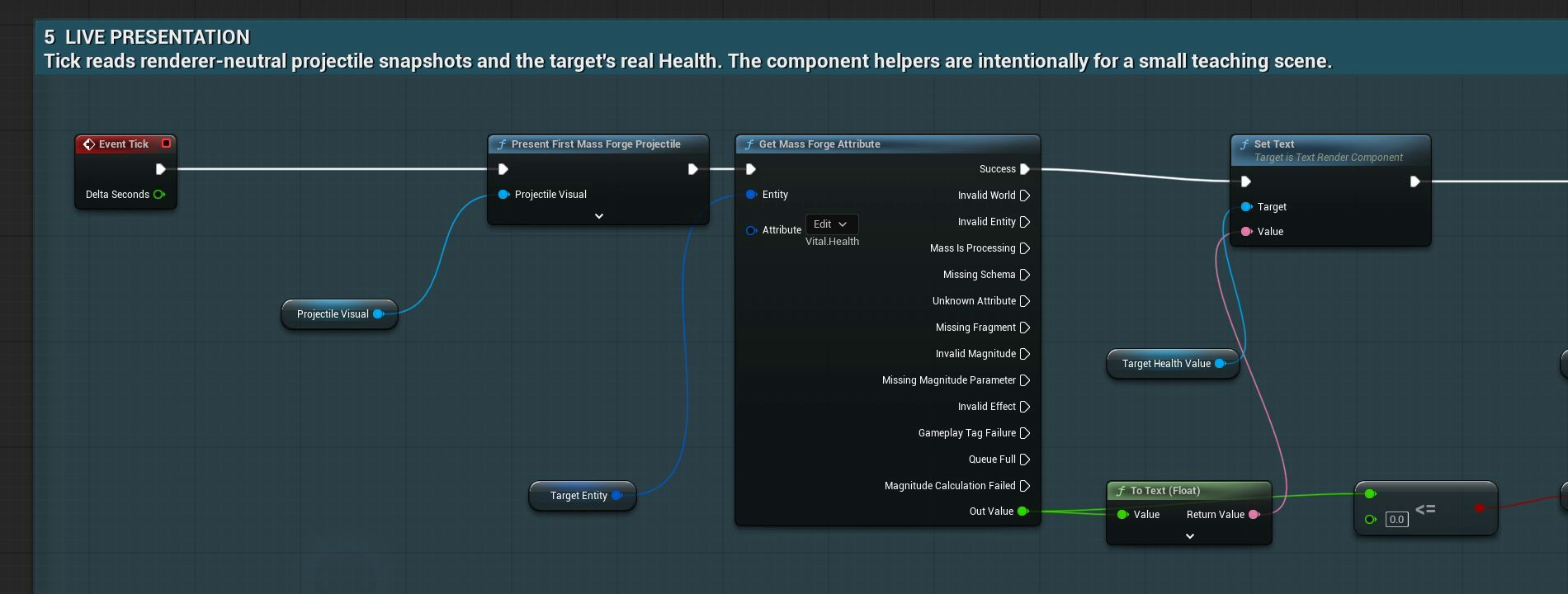
Enumeration-result nodes expand outcomes into execution pins, so a graph can keep success readable without losing precise failure handling. The Quick Start routes the returned value into a display only from Success.
Important operations return a result enum, receipt, or result structure. Do not discard it in production graphs:
- Branch on the top-level result.
- Keep queued request IDs until the matching completion event arrives.
- Use the failed attribute, tag, policy, requirement, effect index, or targeting-policy fields for UI and diagnostics.
- Treat queue acceptance as admission only; the request is revalidated at execution.
- Never infer success from an unchanged value because clamping, zero magnitude, or an idempotent operation can succeed without a visible delta.
Enum-result enumeration nodes expose outcome execution pins. Larger atomic operations preserve their full result structure so Blueprints can inspect calculation and rollback detail without a second query.
Authoring checklist
- Global schemas are configured and pass the Schema Overview diagnostics.
- Literal Attribute ID pins are selected from the schema-backed picker.
- Red or amber Attribute IDs are resolved before asset validation and packaging.
- Direct calls are used only from Mass-idle lifecycle points.
- Queued request IDs are paired with their typed completion event.
- Actor adapters and entity-handle nodes are not mixed accidentally across worlds.
- Optional advanced pins are expanded only when their policy is intentional.
- Every important result is handled or logged with its detailed context.
- The project runs Unreal content validation after schema or gameplay-asset changes.