
Appearance
Attribute persistence and schema migration
Released identity changes require migration
Renaming an Attribute ID or moving it to another domain changes its durable identity. Once snapshots have shipped, never make that change in place without incrementing the schema version, authoring a complete migration path, and testing old-save restoration on a copy.
Mass Forge exposes portable snapshots instead of owning a game-specific SaveGame class. Projects decide when, where, and with what other game state each snapshot is stored.
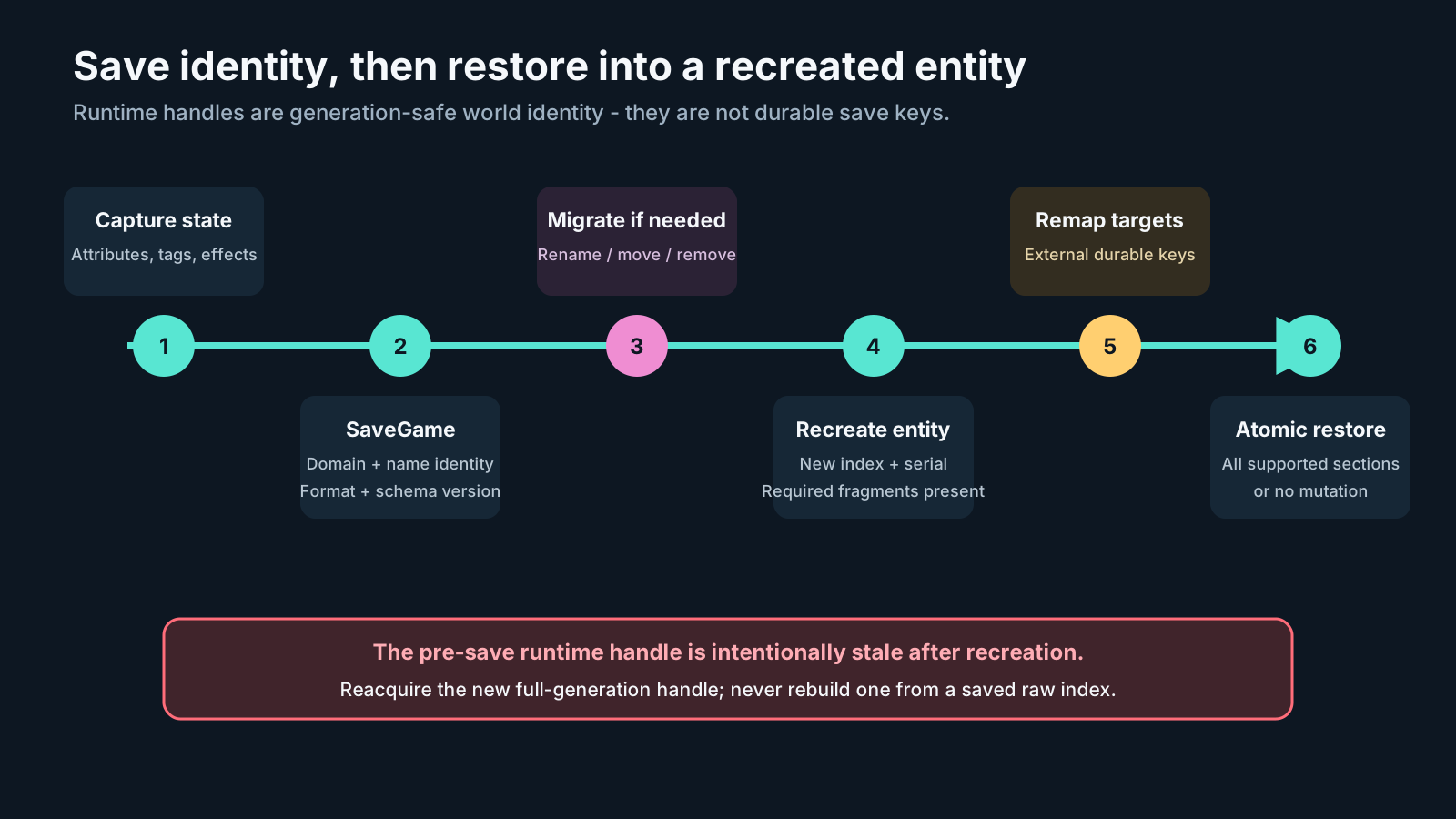
Save stable gameplay identity, not a raw Mass index. Loading recreates an entity with a new generation-safe handle, optionally migrates the stored identities, remaps external targets, and atomically restores supported state; the pre-save handle is deliberately stale.
This guide covers the focused Mass Forge Entity Attribute Snapshot and its schema-migration assets. For a single transaction that also preserves exact counted tags, ability grants, individual/shared cooldowns, charge recovery, regeneration phase, active Persistent Effects, and one active cast/channel, use the durable entity-state persistence guide.
Attribute snapshot format version 1 is deliberately attribute-only. Loading it onto an existing entity leaves other systems unchanged; recreating an entity resets those systems to trait/project defaults. The full pause, dilation, travel, and reset policy is defined in the time, travel, and save contract.
Blueprint workflow
- Call Capture Mass Forge Attribute Snapshot with a valid Mass Forge entity handle.
- Store the returned
Mass Forge Entity Attribute Snapshotin a project-owned SaveGame object, database payload, or other persistence layer. - Recreate or resolve the correct entity after loading.
- If the saved
SchemaVersionis older than the current project setting, apply the required Mass Forge Attribute Snapshot Migration assets in version order. - At a guaranteed Mass-idle lifecycle point, call Restore Mass Forge Attribute Snapshot. From callbacks, async handoffs, or other timing-sensitive Blueprint paths, call Queue Mass Forge Attribute Snapshot Restore instead.
- For a queued restore, store the positive request ID and match it once through On Attribute Snapshot Restore Request Completed.
- Branch on the direct result or queued terminal
Restoreresult and handle every migration or restore failure explicitly.
Capture remains a direct read and returns Mass Is Processing during Mass processing; perform capture from a safe project lifecycle point. Direct restore has the same guard. The queued restore is the production-safe mutation path when timing can overlap Mass: submission validates the copied payload's binary/schema versions, emptiness, duplicate IDs, IDs, finite values, entity presence, and bounded capacity. A rejected receipt has request ID 0 and no completion. An accepted positive ID receives exactly one terminal completion unless its world ends.
Queued restores execute FIFO under Max Queued Snapshot Restores Per Frame and Max Pending Queued Snapshot Restores. They are the first sub-phase of the coordinator's public Attribute Changes phase, before queued raw attribute changes and counted Gameplay Tag changes. Therefore restore establishes saved base values and same-tick queued gameplay mutations apply afterward, independent of cross-category submission order. Work enqueued by a restore completion waits until the next coordinator tick.
Format contract
Format version 1 stores a project-owned SchemaVersion plus an array of stable attribute IDs and finite float values. Capture reads the schema version from Project Settings > Mass Forge > Global Attribute Schemas > Persistence. Capture order is deterministic: Vital, Combat, and Support domains, each in ascending stable schema-slot order. Unused capacity slots are not serialized.
Both fields of the reusable Mass Forge Attribute ID—domain and name—are SaveGame properties. This is required because Unreal applies SaveGame filtering recursively inside nested structs. The release automation performs an actual tagged-archive round trip and a rename migration, rather than treating the outer snapshot property's SaveGame flag as sufficient proof.
Restore resolves every saved ID by domain and name against the current schemas. This allows slot layout repair without reinterpreting a saved value. Current schema clamping is applied during restore, so a newly tightened valid range remains authoritative.
Slots are compact runtime locations, not save identities. An identity-preserving slot repair or deliberate offline layout change therefore needs no snapshot conversion: restore resolves each saved domain/name into the current slot. Do not change a deployed slot layout while affected entities are alive; live fragments already contain values in the old layout. Apply schema changes before creating/restoring entities, or recreate the affected entities and restore their identity-based snapshots. Any domain/name rename, move, or removal is a persistent identity change and requires the versioned migration workflow below.
Restore requires the binary format to equal the build's CurrentFormatVersion and the snapshot schema version to match the current project setting. Unsupported Version returns both SnapshotFormatVersion and ExpectedFormatVersion; Schema Version Mismatch returns both SnapshotSchemaVersion and ExpectedSchemaVersion. Both checks occur before any entity value changes, so a Blueprint can display an exact upgrade message instead of a generic load failure. Snapshots written before schema versioning was introduced load as schema version 1.
Set Oldest Supported Snapshot Schema Version to the oldest integer schema version whose saves the current release promises to load. The Mass Forge Project Health dashboard requires a valid directed migration path from every version in that inclusive support window to the current Snapshot Schema Version. Set both values equal only when older saves are intentionally unsupported. See PROJECT_HEALTH_DASHBOARD_GUIDE.md for the exact coverage rule and remediation workflow.
Atomicity and failures
Restore validates the complete snapshot before changing fragment state. Unsupported versions, duplicate IDs, retired or renamed attributes, missing schemas/fragments, and non-finite values reject the whole operation. The result reports the failing attribute when applicable. Successful changes publish the normal attribute-change event with the supplied source name. For queued restores, all attribute-change events publish after the atomic state commit and before the one request-completion event.
The queue owns a deep copy of the submitted snapshot and preserves the full entity index/serial generation plus source name. It revalidates versions, stable IDs, schema/fragments, finite values, and entity generation at execution. A destroyed target completes as Invalid Entity and can never redirect the restore into a replacement entity that reuses its index. Queue Full is explicit back-pressure: defer or shed load, then tune the two measured queue limits only when necessary.
A snapshot may contain a subset of configured attributes, which is useful for project-owned save policies. Capture itself always emits every configured attribute found on the entity.
Migration assets
Mass Forge intentionally does not guess when an attribute has been renamed, moved to another domain, or retired. Create a Mass Forge Attribute Snapshot Migration Data Asset for each supported schema transition:
The schema asset's Mass Forge Schema Overview repeats this warning beside its repair tools. Slot repair preserves attribute identities and does not require migration; editing an attribute name or changing its domain does. See SCHEMA_EDITOR_GUIDE.md for the complete authoring workflow.
- Give the asset a stable
MigrationId. - Set
SourceSchemaVersionto the version stored by old saves. - Set
TargetSchemaVersionto a greater version. - Add a Rename/Move rule for every changed stable ID and a Remove rule for every intentionally retired value.
- Increment
SnapshotSchemaVersionin project settings to the final target version. - Before restore, call Migrate Mass Forge Attribute Snapshot once per transition, in ascending version order.
When the attribute snapshot is nested inside Mass Forge Entity State Snapshot, migrate a temporary copy of State.Attributes through the complete chain and replace that nested member only after each migration succeeds. Do not change the surrounding entity-state FormatVersion: format 1–4 compatibility and attribute-schema migration are independent axes. The complete population and relationship ordering is documented in ENTITY_STATE_PERSISTENCE_GUIDE.md.
Rename/Move may change both the name and the domain. Rules use exact stable IDs; missing rules leave unrelated snapshot entries unchanged, which keeps subset snapshots valid. Migration validates the complete input before publishing output. Duplicate source values, two rules converging on one target, collisions with an already-present target, invalid IDs, non-finite values, wrong source versions, and unsupported formats fail atomically with a machine-readable result.
Migration changes identity only; it does not reinterpret or scale values. The final restore resolves the migrated IDs against the live schemas and applies the live bounds. If a gameplay update changes the meaning or units of a value, perform that project-specific conversion in the surrounding SaveGame upgrade before restore.
Scope
This focused snapshot covers attribute values only. Ability grants, cooldown clocks, Persistent Effects, active Ability Lifecycles, regeneration timing remainders, ownership, and external Actor state are not silently included. Use durable entity-state format 4 for tag/ability/cooldown/charge, regeneration-interval, active Persistent Effect, and one active cast/channel continuity. External lifecycle targets require the explicit project-owned relationship-key remap described in the durable guide.