
Appearance
Gameplay event history
Mass Forge provides one optional world-level event stream for debugging, UI prototypes, telemetry adapters, and future editor tooling. It normalizes the existing attribute, whole-entity state restore, Instant Effect, counted Gameplay Tag, Damage, Persistent Effect, and Ability delegates without replacing them. Existing subsystem delegates remain the authoritative integration points for gameplay code that needs a specific strongly typed payload.
Recording is disabled by default and adds no per-entity fragment or UObject. When enabled, records are retained in a bounded circular history. The oldest record is overwritten when the configured capacity is reached.
Blueprint setup
- Get the Mass Forge Gameplay Event Subsystem for the active world.
- Call Set Gameplay Event Recording Enabled with
Enabled = true. SetClear Existing Historywhen starting a new diagnostic session. - Optionally call Add Gameplay Event Watch for up to 64 live entity handles. With no watched entities, every supported event is eligible. With one or more watches, an event is captured only when a watched entity is its source or target.
- Bind On Gameplay Event Recorded for live presentation, or call Get Gameplay Event History with a filter and a positive maximum result count.
- Disable recording when the diagnostic session ends. Use Clear Gameplay Event History and Clear Gameplay Event Watches when their state should also be reset.
The history capacity is Project Settings > Mass Forge > Global Attribute Schemas > Debugging > Max Recorded Gameplay Events. The supported range is 32–65,536 and the default is 2,048. Size it from measured diagnostic needs; each retained record contains copied identifiers and handles.
Editor event browser
Open Tools > Debug > Mass Forge Event History. The editor-only browser exposes the runtime contract without requiring a debug Blueprint:
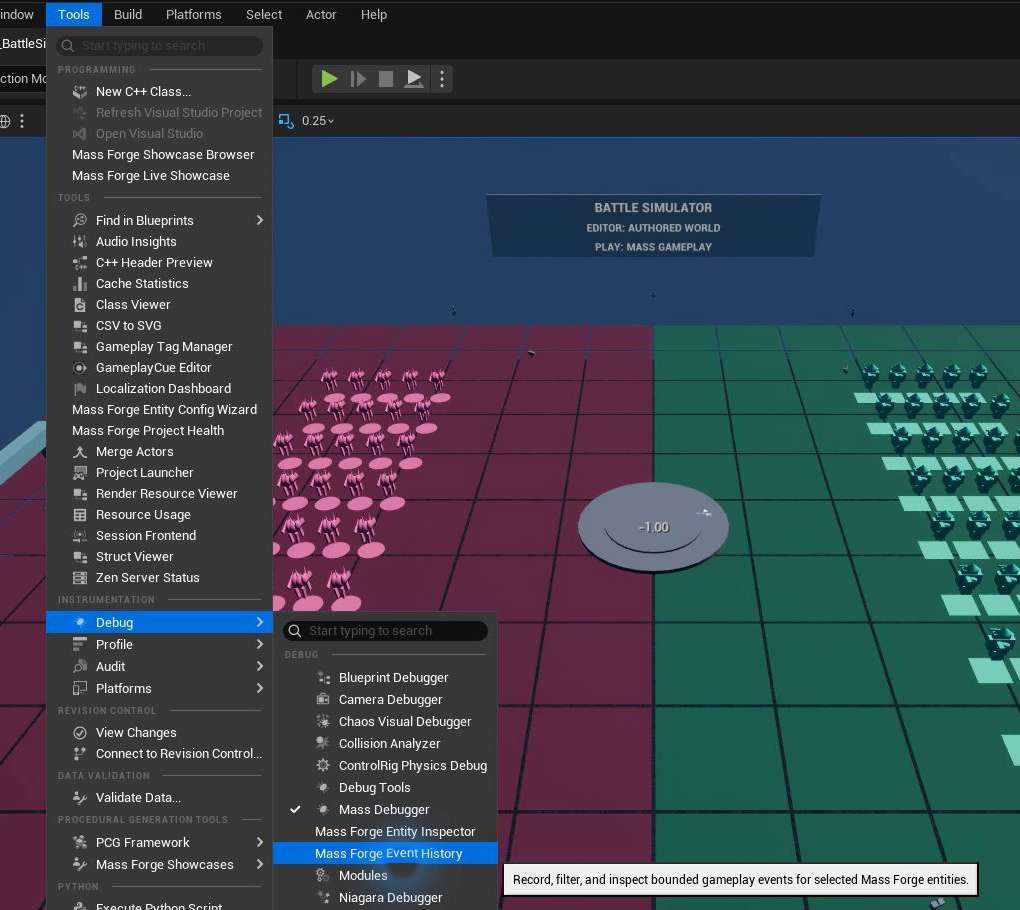
Open the tab after Play begins, then enable recording only for the diagnostic session that needs a timeline.
- enable or disable recording and clear retained history;
- auto-refresh or manually refresh the active PIE, game-preview, or editor world;
- select one event category, search across identities/tags/attributes/entities/outcomes, limit the newest returned records, optionally display only the current handle, and copy the visible rows as tab-separated diagnostic text;
- add a validated handle manually, resolve the selected represented Actor, or use the actorless/represented entity selected in Unreal's Mass Debugger;
- inspect and remove individual watches or clear the complete watch list;
- read sequence, world time, type, source/target handles, definition, request/attribute/tag/outcome, instance, and ordinal details in one structured timeline table.
The browser owns no gameplay state. Closing it does not disable recording automatically because Blueprint tooling or another editor view may share the same world subsystem. Recording and history are world-local and naturally reset when PIE ends. An empty watch list means capture all supported events; it is not the same as capturing none.
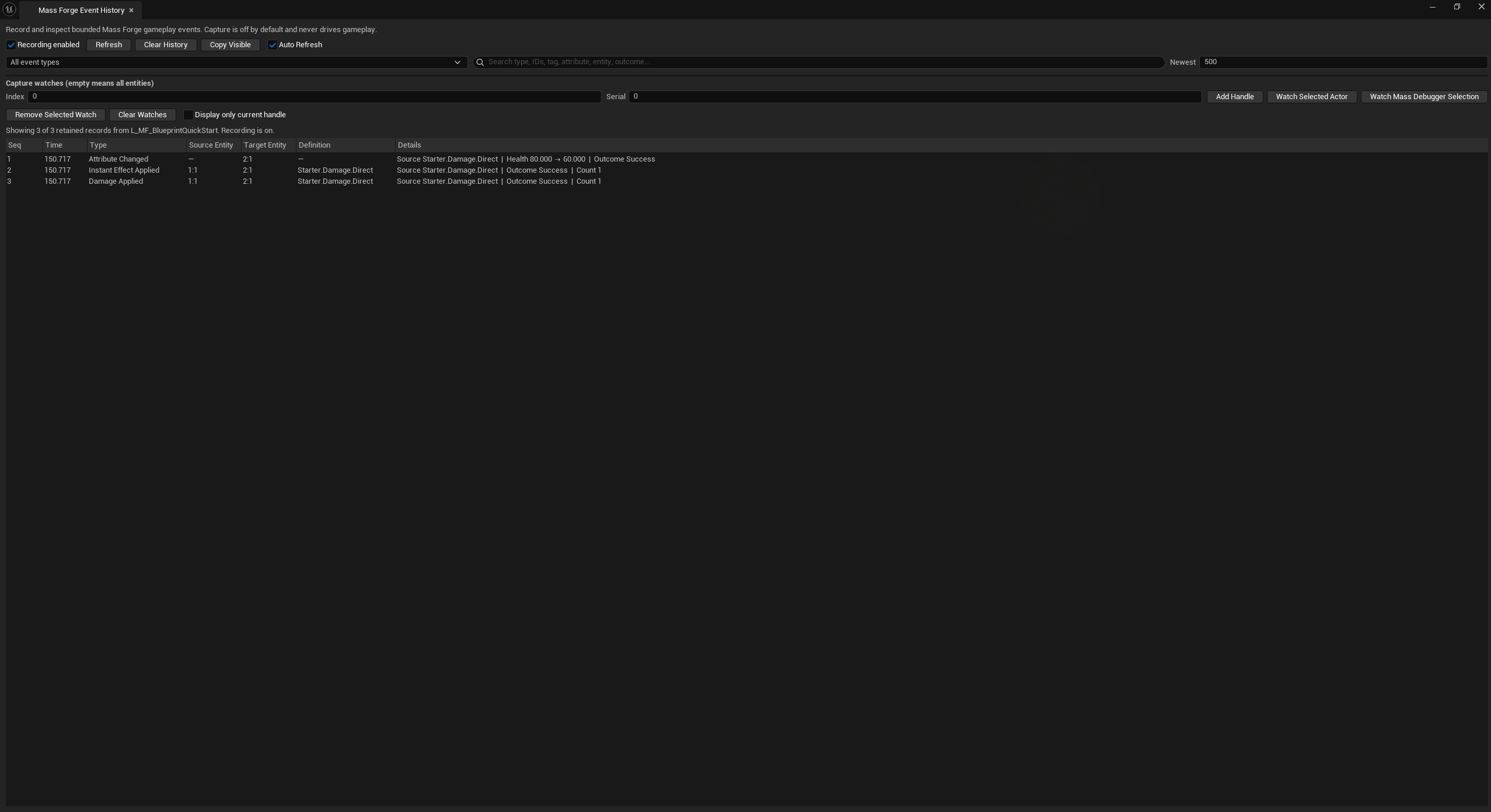
The screenshot is a live Blueprint Quick Start impact: one traveling projectile resolved Starter.Damage.Direct, changed Health from 80 to 60, and retained source 1:1, target 2:1, and the successful enclosing Effect and Damage records. The ordered rows make it possible to distinguish visual launch, impact, transaction changes, and the final gameplay result.
Record contract
Every captured record receives a world-local monotonic Sequence and World Time Seconds. Records returned by a query are chronological. When more records match than Max Results, the newest matching records are returned while preserving chronological order.
| Field | Meaning |
|---|---|
Type | Stable normalized category. |
Request Id | Positive only on terminal queued-request records; direct and lifecycle records use zero. |
Source Entity / Target Entity | Generation-checked endpoints when the originating payload supplies them. |
Definition Id | Effect, Damage Definition, or Ability identity. |
Source Id | Weapon, system, snapshot, or project-defined logical source. |
Attribute, Previous Value, New Value, Was Clamped | Attribute-change data when applicable. |
Gameplay Tag, Previous Count, New Count | Counted Gameplay Tag data when applicable. |
Outcome | Stable enum-value name for success, failure, disposition, or lifecycle end reason. |
Operation | Stable enum-value name for a queued operation or lifecycle phase. |
Instance Id | Persistent Effect handle ID or Ability lifecycle ID. |
Ordinal | Persistent period number or Ability channel tick. |
Item Count | Changed attributes/tags, restored durable-state items, stack count, or another type-specific bounded count. For a whole-entity restore it is the sum of attribute, exact counted-tag, ability-grant, and cooldown-group entries actually reported by the restore result. |
Fields that do not apply to an event type remain unset. Attribute and tag changes are published before their enclosing successful Instant Effect record, matching the transaction publication contract. Failed atomic gameplay does not manufacture provisional change records.
The underlying typed results preserve the same diagnostic identity used by this stream. FMFAttributeChangeResult retains operation and logical source; FMFInstantEffectResult retains source entity, target generation, Effect ID, and logical source through pre-mutation failure; FMFAbilityActivationResult retains the submitted source and optional target; and FMFPersistentEffectRequestCompletion retains submitted Apply context or the active removal context captured at queue admission. This prevents a terminal failure from becoming less diagnosable than a success merely because no application event was emitted.
Field-coverage matrix
| Event family | Guaranteed applicable identity and change fields |
|---|---|
| Attribute change / request | Target, attribute, old/new values, clamp state, logical source; queued completion also has request ID, operation, and outcome. |
| Attribute or entity-state restore | Target, logical source, request ID, outcome, and restored count including active Persistent Effects and an active Ability Lifecycle; successful constituent changes separately retain exact attribute/tag/ability details. |
| Instant Effect | Source, target, Effect ID, logical source, outcome, and changed-item count; queued completion also has request ID, including failures before mutation. |
| Counted Gameplay Tag | Target, tag, old/new counts, and outcome; queued completion also has request ID and operation. The tag API has no source parameter to invent. |
| Damage and death | Source, target, Damage ID, logical source, and outcome; queued/death-destruction records retain their request IDs. |
| Persistent Effect | Source context when supplied, target, Effect ID, handle, outcome/disposition, and stack or period count; queued completion also has request ID and operation, including failed Apply context. Period and removal records retain source identity even when recording starts after application. |
| Ability | Source, optional target, Ability ID, and outcome; lifecycle records add lifecycle ID/phase/tick, and queued completions add request ID and operation. Failed direct activation retains its attempted target. |
| Custom | The project supplies whichever generic fields describe its decision or mind breadcrumb; Mass Forge assigns sequence/time and sanitizes type/request ID. |
The stream includes:
- direct changes plus terminal queued completions for attributes, attribute snapshots, whole-entity state snapshots, Instant Effects, and counted Gameplay Tags;
- Damage application, terminal Damage requests, kill, deactivation request, and destruction completion;
- Persistent Effect apply, period, remove, stack, and terminal queued-operation records;
- Ability grant, revoke, activation, commit, failure, request completion, lifecycle start, channel tick, and lifecycle end.
Entity State Restore Completed is emitted exactly once for every accepted queued whole-entity restore, including an execution-time failure such as a retired entity generation. It retains the positive request ID, exact target handle, logical restore source, stable result name, and restored-item total. That total includes the lifecycle as one item when format 4 restores one. A restore rejected before admission has no request ID and does not manufacture a terminal history record.
After Sequence supports incremental polling without reprocessing records already consumed. Filters may combine event types, either endpoint entity, definition ID, attribute, Gameplay Tag, and sequence. An unset filter field matches all values. Invalid Limit means Max Results was outside 1–65,536.
Project-defined mind and decision records
Use Record Custom Gameplay Event to place bounded project data in the same stream. This supports AI intent, target choice, state changes, or other “what is this entity thinking?” breadcrumbs without making Mass Forge own the project's AI model. Fill only the relevant generic fields. Mass Forge forces Type = Custom, assigns sequence/time, and clears caller-supplied request correlation.
Custom records obey recording state, watch filtering, and capacity exactly like built-in records. For richer point-in-time AI state, use the Entity Inspection Provider interface; event history is the time-ordered breadcrumb view.
Boundaries and limitations
- This is diagnostic and presentation data, not gameplay authority, replication, prediction, rollback, or save-game state.
- Listening to
On Gameplay Event Recordedmust not be required for a gameplay transaction to succeed. - Watch handles are generation-sensitive. Reacquire a handle after destruction, pooling, representation replacement, world travel, or PIE restart.
- Persistent Effect period results and the additive context-aware removal event carry source identity directly. Starting recording after an effect was applied does not erase source fields from its later period or removal records; no global active-effect scan is required when recording is enabled.
- High-volume compiled processor commands intentionally do not broadcast one UObject/delegate event per entity. Use their bounded completion mailbox and population benchmark instead of event history for million-entity throughput analysis.
- World replacement destroys the subsystem and its history. Copy/export any project telemetry before travel if it must survive.
The Entity Inspector complements this browser: use inspection for current state and Event History for the ordered changes that produced it.