
Appearance
Memory and capacity guide
Mass Forge keeps gameplay state in fixed-capacity Mass fragments. It does not require one UObject, Actor, Actor Component, Ability object, Effect object, targeting object, or debugger object per entity. Definition Data Assets and project provider objects are shared; inspection snapshots are built only when requested.
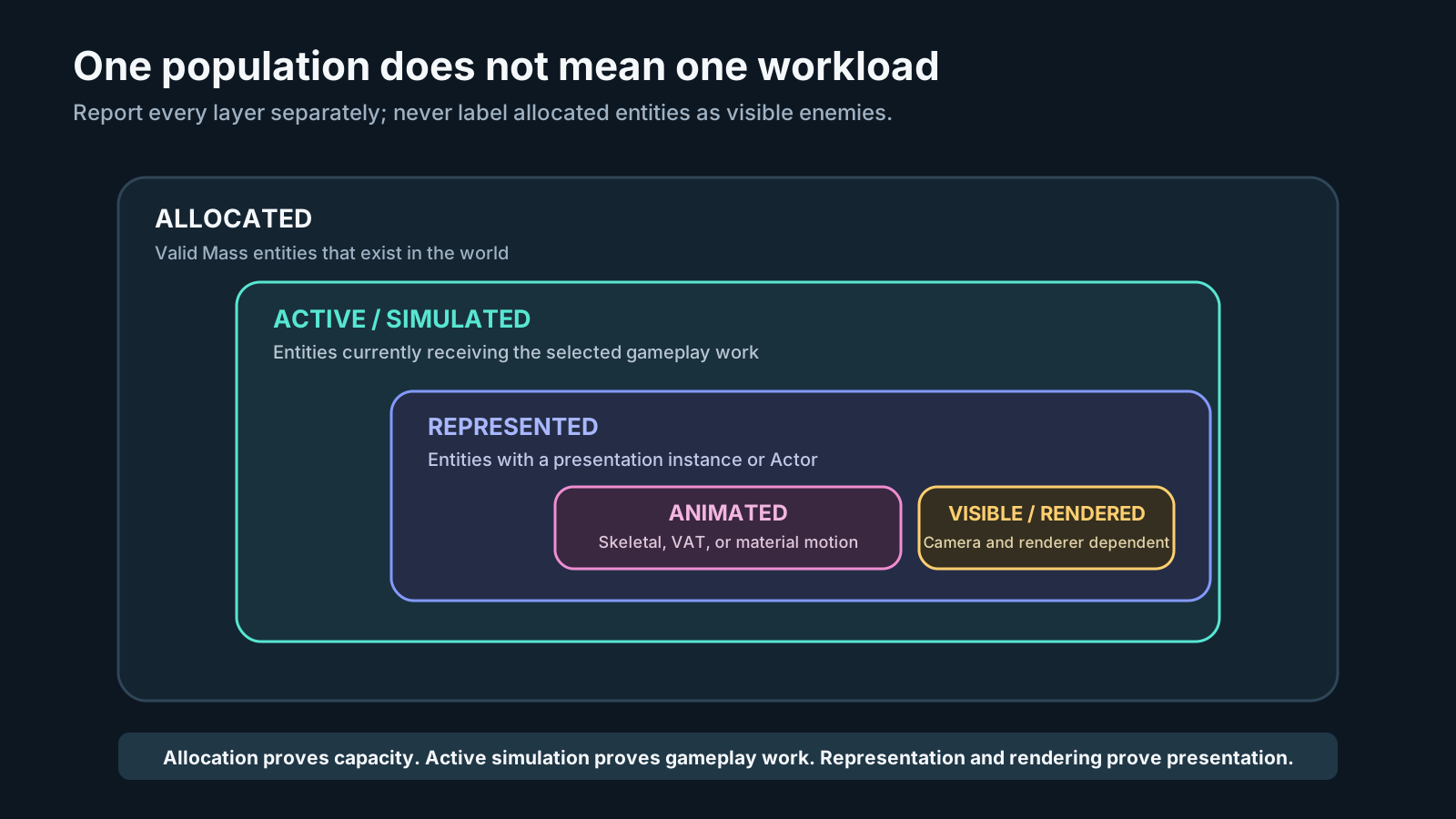
These counts answer different questions and must be reported separately. Allocation proves that Mass entities exist; active simulation proves gameplay work; representation, animation, and visibility describe progressively narrower presentation workloads.
Use Get Mass Forge Memory Footprint in Blueprint or C++ to obtain the native fragment sizes for the exact running build. The same values are included in Copy Support Report. The node is world-independent and allocates only its returned diagnostic array; it never adds state to an entity.
Verified Win64 fragment payloads
The following Unreal reflected structure sizes are the Mass allocation payloads. Plain C++ sizeof is not authoritative for inherited USTRUCT fragments and can be smaller. Automation checks every reported value against the running engine's reflected size and fails if a Mass Forge fragment is added without entering the report. The cross-version values below are considered verified only after the full Unreal Engine 5.6.1, 5.7.1, and 5.8.2 matrix passes.
| Fragment | Added or required by | Storage scope | Bytes |
|---|---|---|---|
MF_VitalAttributesFragment | Mass Forge Attributes Trait | Per entity | 64 |
MF_CombatAttributesFragment | Mass Forge Attributes Trait | Per entity | 192 |
MF_SupportAttributesFragment | Mass Forge Attributes Trait | Per entity | 128 |
MF_GameplayTagFragment | Mass Forge Gameplay Tag Trait | Per entity | 420 |
MF_PersistentEffectsFragment | Mass Forge Persistent Effects Trait | Per entity | 1,288 |
MF_PersistentAttributeModifiersFragment | Mass Forge Persistent Effects Trait | Per entity | 1,736 |
MF_AbilityFragment | Mass Forge Ability Trait | Per entity | 472 |
MF_RegenerationFragment | Mass Forge Regeneration Trait | Per entity | 260 |
MF_HighVolumeEffectCommandFragment | Mass Forge High Volume Effects Trait | Per entity | 16 |
MF_ProjectileFragment | Mass Forge Projectile Trait | Per projectile entity | 144 |
MF_DerivedAttributesSharedFragment | Mass Forge Derived Attributes Trait | Per archetype | 676 |
MF_HighVolumeEffectSetSharedFragment | Mass Forge High Volume Effects Trait | Per archetype | 2,388 |
The Derived Attributes graph and high-volume effect table are const-shared fragments. Matching entities in an archetype share one compiled 676-byte maximum-capacity derived graph and, when opted in, one 2,388-byte maximum-capacity effect table. Neither repeats its compiled rules per entity. Their required Vital, Combat, and Support attribute bags are already counted under the Attributes Trait.
Configuration totals
These totals are exact Mass Forge-owned native payload sums, not estimates of complete process memory.
| Configuration | Included Mass Forge state | Bytes/entity | 10,000 entities | 100,000 entities | 1,000,000 entities |
|---|---|---|---|---|---|
| Attributes Only wizard preset | Vital + Combat + Support | 384 | 3.66 MiB | 36.62 MiB | 366.21 MiB |
| Combat Ready wizard preset | Attributes + counted tags + persistent timers/modifiers + abilities | 4,300 | 41.01 MiB | 410.08 MiB | 4.00 GiB |
| Full example configuration | Combat Ready + Regeneration + high-volume command mailbox | 4,576 | 43.64 MiB | 436.40 MiB | 4.26 GiB |
| Actorless projectile | Projectile motion/impact state | 144 | 1.37 MiB | 13.73 MiB | 137.33 MiB |
Formula: Mass Forge payload = entity count × selected per-entity fragment bytes. Projectile entities normally occupy a separate 144-byte Mass Forge archetype rather than carrying the 4,576-byte combatant preset. Add 676 bytes for each distinct maximum-capacity Derived Attributes graph/archetype and 2,388 bytes for each distinct maximum-capacity High Volume Effects table/archetype.
These figures deliberately exclude Mass entity/chunk metadata, alignment between structure-of-arrays regions, allocator slack, transforms, representation, LOD, navigation, collision, movement, project fragments, rendering, animation, assets, queues, world subsystems, and engine overhead. Measure the packaged project to obtain total resident memory.
Choosing a scalable archetype
- Use Attributes Only for populations that need stats but no active ability/effect state.
- Add Gameplay Tags or Abilities only to archetypes that execute those features.
- The Persistent Effects Trait adds both timer-instance and reversible-modifier storage. Do not attach it to background populations that never receive duration-based effects.
- Add Regeneration only where passive rules are required. A project can instead schedule lower-frequency aggregate updates for distant or dormant populations when its gameplay permits that approximation.
- Derived Attributes are appropriate for large matching populations because their compiled rules are shared per archetype.
- High Volume Effects adds one 16-byte command/completion mailbox per opted-in entity; its Apply/Remove table is shared per archetype. Use it only when a C++ producer can consume its explicit bounded workflow.
- Target selection reads existing transforms/representation and uses bounded world-level providers; it adds no Mass Forge fragment.
- Entity inspection is on-demand; custom providers are bounded, weak world-level references rather than per-entity storage.
A million-entity headline is not equivalent to a million fully featured combatants. On Win64, Mass Forge's Full Example payload alone is about 4.26 GiB before any engine or project state. A credible high-count design separates total simulated entities, entities carrying combat features, entities represented or animated, and entities updated during a frame.
Profiling workflow
- Call Get Mass Forge Memory Footprint in the packaged target and record its totals with the engine, platform, and plugin version.
- Count entities by actual archetype, not by the largest possible configuration.
- Estimate the Mass Forge payload from each archetype's selected fragments.
- Measure process memory before spawning, after spawning and settling, and at the peak gameplay population.
- Subtract the baseline only as a diagnostic comparison; keep the absolute peak in release evidence.
- Record total, represented, visible, animated, and actively processed populations separately.
- Capture average and worst-frame game-thread, worker-thread, rendering, and memory figures on named hardware.
This guide records storage only. It does not claim 10k, 100k, or 1M throughput; those benchmark results remain a separate roadmap gate until measured in packaged benchmark maps on documented reference hardware.