
Appearance
Gameplay starter kit
The Entity Config Wizard can create a complete editable starter package in project Content. The package is a teaching baseline, not a mandatory taxonomy: duplicate, rename, move, or replace its assets after assigning project-stable IDs.
Create the package
- Open Tools > Mass Forge Entity Config Wizard.
- Choose Combat Ready.
- Select a project folder such as
/Game/Combat/MassForgeand a unique base name. - Keep Create editable gameplay starter kit enabled.
- Select Create Entity Config Package.
- Open Mass Forge Project Health, scan, and resolve every error before using the assets in a release map.
The operation never overwrites existing assets. Unreal creates unique package names while the stable gameplay IDs remain visible for deliberate review.
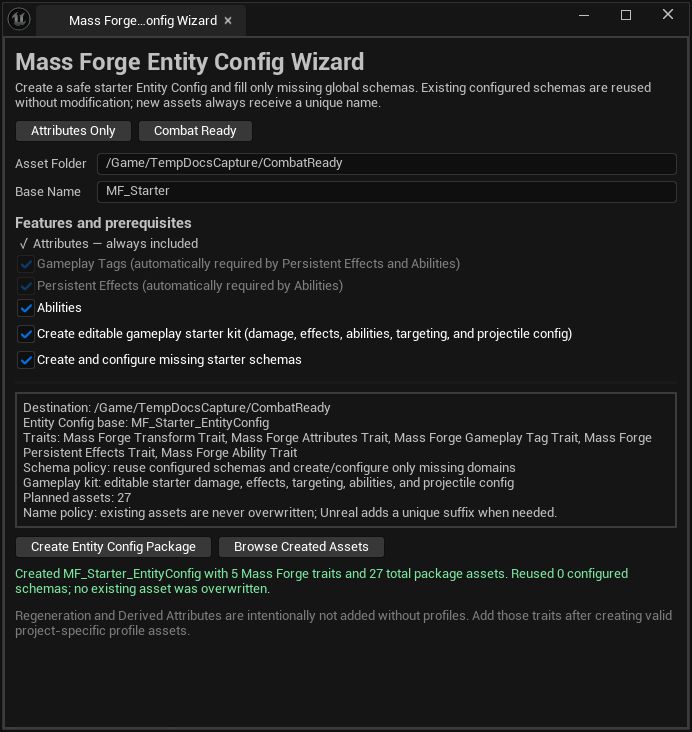
A successful default Combat Ready run reports five traits and 27 package assets. If the counts or schema reuse differ, review the destination and configured project schemas before continuing.
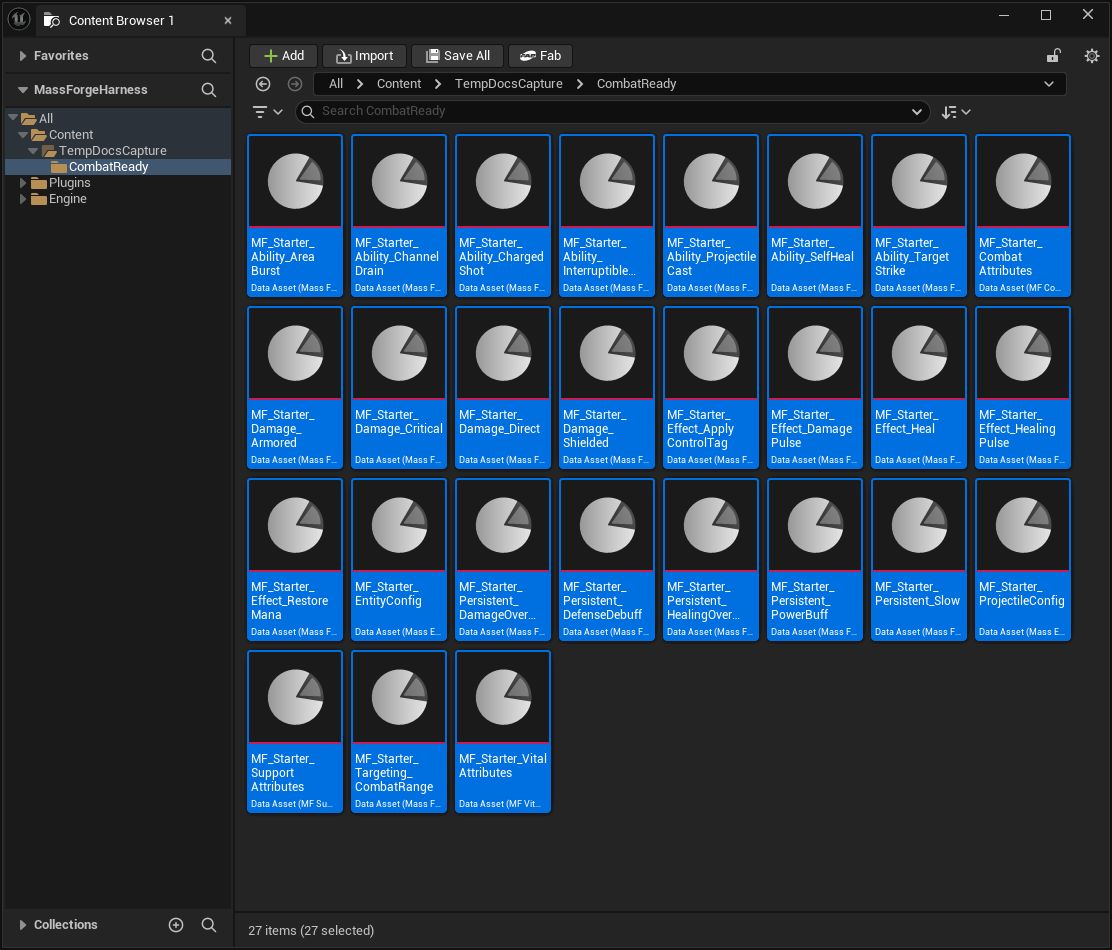
The starter kit is not a sealed sample framework. Every selected item is an ordinary Unreal asset owned by the project and can be opened from this result view.
Generated assets
| Group | Assets | What they teach |
|---|---|---|
| Schemas | Vital, Combat, Support | Stable attribute IDs, defaults, bounds, and domain ownership |
| Entity configs | Combat Ready Entity Config, Projectile Config | Required trait closure, standard transforms, and actorless projectile storage |
| Damage | Direct, Armored, Shielded, Critical | Final damage, armor ratio, shield routing, source power, and deterministic critical input |
| Instant effects | Damage Pulse, Healing Pulse, Heal, Restore Mana, Apply Control Tag | Atomic attribute/tag transactions and a replaceable control-tag example |
| Persistent effects | Damage Over Time, Healing Over Time, Power Buff, Slow, Defense Debuff | Periodic execution, refresh stacking, buffs, debuffs, and reversible Add/Multiply modifiers |
| Targeting | Combat Range | Actorless-safe 2D range admission using Mass transforms |
| Abilities | Self Heal, Target Strike, Projectile Skillshot Contract, Channelled Drain, Area Burst Payload, Charged Shot, Interruptible Cast | Self/target execution, area orchestration, costs, cooldowns, cast/channel timing, independent charges, targeting, interruption, and projectile handoff |
The complete Combat Ready starter operation creates 27 editable assets. The generated examples use MassForge.Sample.Status.Stunned only as a visible teaching tag; replace it with the project's own control taxonomy before shipping.
Inspect the shipped Blueprint graph first
Enable Show Plugin Content in the Content Browser, then open:
/MassForge/BlueprintExamples/Blueprints/BP_MF_BlueprintQuickStart
The matching saved learning map is intentionally easy to find at the plugin root:
/MassForge/L_MF_BlueprintQuickStart
Its compiled Event Graph is deliberately linear and numbered. It spawns distinct source and target entities, stores both generation-safe handles, changes Health, applies entity-to-entity damage, applies healing, grants and activates an ability, and launches a real Mass-owned projectile with impact damage. A separate numbered Tick section drives only the small scene's visible projectile component from renderer-neutral snapshots. Every gameplay node references the editable assets under /MassForge/BlueprintExamples/Data.
The map contains saved lighting, a camera, and the placed Blueprint teaching actor. The Blueprint's source/target meshes, teaching deck, and in-world labels are Construction Script components, so the lesson is visible and inspectable before PIE. Runtime code does not construct the world behind the user's back.
This graph is the complete inspectable Blueprint learning slice. It owns input, source/target spawning, visible failure diagnostics, Health display, damage, healing, ability grant/activation, impact-driven projectile presentation, first-death handling, and target replacement. No sample C++ class owns that tutorial's gameplay sequence. Copy the Blueprint and Data Assets into project Content before modifying them; plugin updates may replace the originals. The public Entity Config Wizard creates the same 27-asset teaching package in a project-owned /Game folder without overwriting existing content.
A blank project uses the three plugin starter schemas as replaceable defaults, so this map can run immediately. The first time the Entity Config Wizard creates a project-owned package, it treats those plugin teaching defaults as templates—not as the project's permanent schemas—and creates/registers editable /Game copies. Explicit project settings always take precedence.
For maintainers, the plugin-owned copy is reproducible rather than hand-maintained:
UnrealEditor-Cmd <Project>.uproject -run=MFGenerateBlueprintExamples -RebuildGeneratedAssets
-RebuildGeneratedAssets removes only the exact plugin-owned /MassForge/BlueprintExamples generated root. It must not be used for project-owned copies.
Projectile skillshot contract
The generated Projectile Skillshot ability intentionally does not apply damage at cast completion. Its cast lifecycle defines admission, Mana cost, range, cooldown, and release timing. The Blueprint recipe launches a Mass Forge projectile when that lifecycle commits; the projectile carries the Damage Definition and Damage Request, and damage is committed only when the projectile impact resolves.
This separation prevents the common sample bug where Health changes immediately while a decorative projectile is still travelling.
Blueprint ownership
The generated Data Assets contain rules and stable IDs. The project Blueprint owns presentation and orchestration:
- keep the returned entity handle after Spawn Mass Forge Entity;
- grant and activate the selected Ability asset;
- observe cast/channel lifecycle events;
- launch the projectile with the generated Projectile Config;
- render projectile snapshots with Niagara, HISM, an Actor pool, or no renderer;
- update UI from structured results and subsystem events;
- react to kill/deactivation events according to the project's pooling policy.
Mass Forge owns bounded actorless state, validation, transactions, scheduling, and deterministic results. It does not silently invent project input, targeting visuals, faction rules, animation, or UI.
Safe modification order
- Duplicate the generated package before experimenting with released stable IDs.
- Adjust schema defaults and bounds before creating dependent save data.
- Point effects and damage definitions at the intended attributes.
- Configure ability costs, cooldowns, target policies, and payloads.
- Connect projectile launch and presentation in Blueprint.
- Run Project Health and native content validation.
- Play the Blueprint Quick Start map and inspect the entity in the Entity Inspector.
See Blueprint quick start, gameplay asset authoring, Mass projectiles, and entity lifecycle safety.