
Appearance
Attribute schema editor
Mass Forge adds a focused authoring overview to every Mass Forge Vital Attributes Schema, Mass Forge Combat Attributes Schema, and Mass Forge Support Attributes Schema Data Asset. Open one of those assets and use the Mass Forge Schema Overview section at the top of the Details panel.
The overview is an authoring aid; the schema asset remains ordinary Unreal data that can be reviewed, versioned, and referenced by the project.
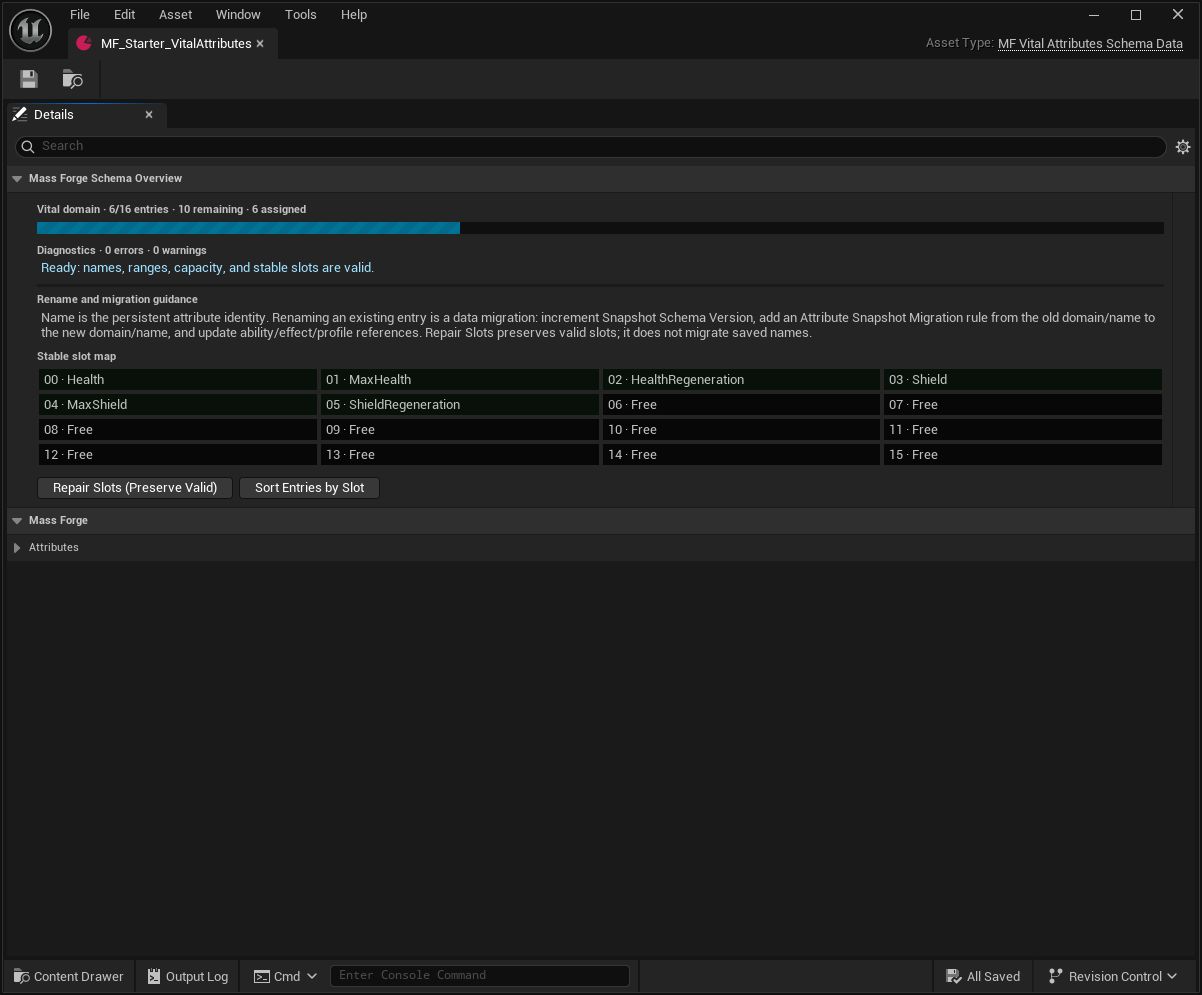
This is the healthy state to look for before dependent assets are authored: no errors or warnings, every entry assigned once, and unused slots still available.
For a first-time project, Tools > Mass Forge Entity Config Wizard can create valid starter schemas and register missing domains without modifying schemas that are already configured. See ENTITY_CONFIG_WIZARD_GUIDE.md.
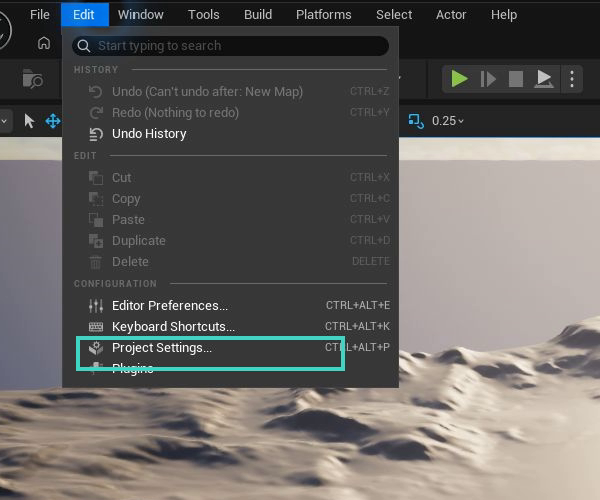
Open the standard project settings from Edit > Project Settings after generating or manually creating schemas.
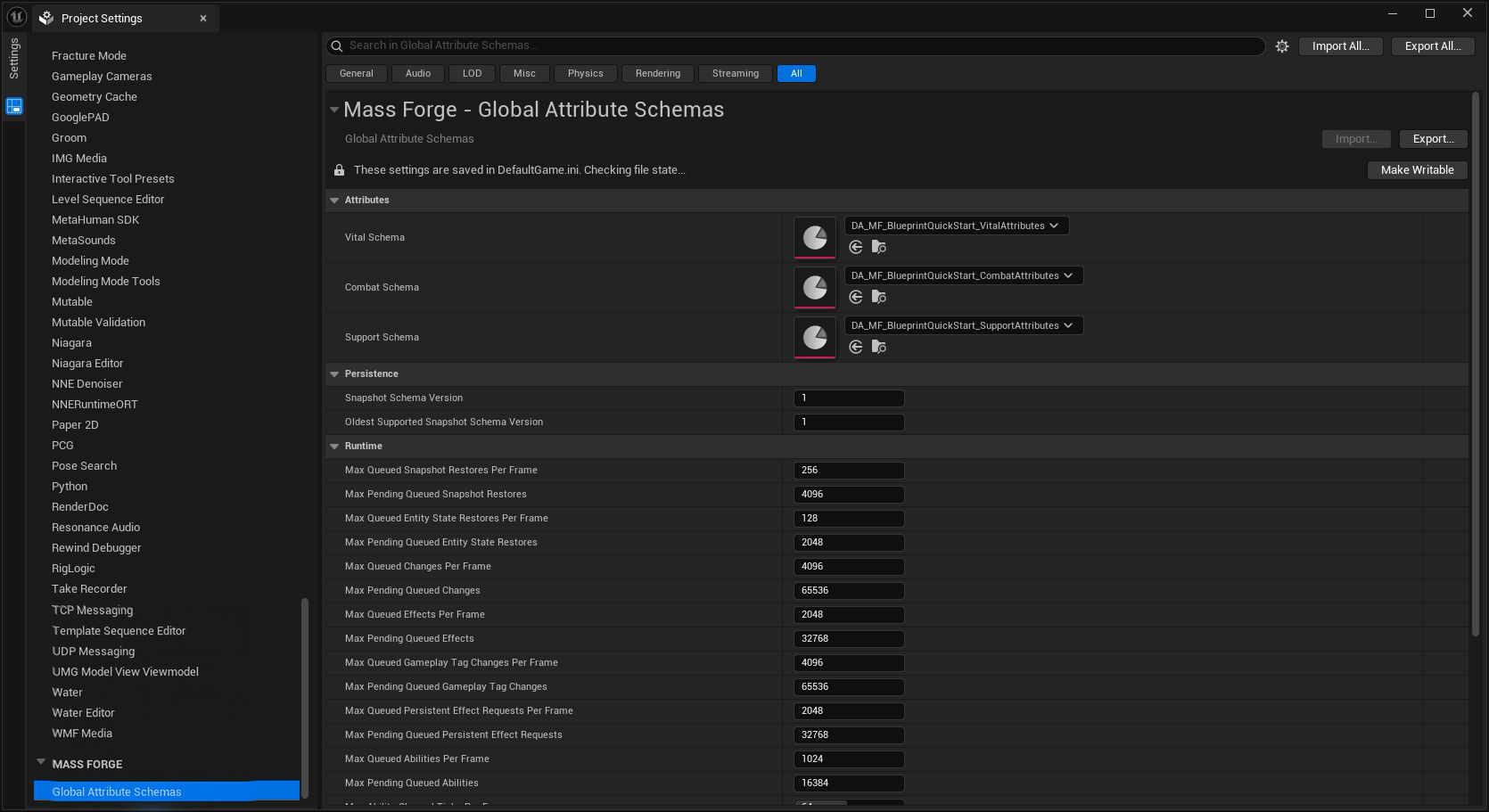
The three domain assignments are the project-wide source of truth used by schema-backed Blueprint pickers, Data Assets, bindings, and runtime resolution.
What the overview shows
- The schema domain and its fixed runtime capacity: Vital has 16 slots, Combat has 48, and Support has 32.
- Authored entry count, assigned-slot count, remaining capacity, and a color-coded capacity meter.
- A complete slot map, including unused slots and collisions.
- Blocking errors for missing or duplicate names, duplicate or out-of-range slots, invalid clamp ranges, defaults outside their authored clamp range, non-finite values, and over-capacity schemas.
- A warning when the schema is close to capacity.
- Rename guidance beside the repair controls so identity changes are not mistaken for layout cleanup.
The normal Unreal validation command remains authoritative for cook and release checks. The overview brings the same high-value problems into the asset authoring loop before packaging.
Recommended authoring workflow
- Add an entry and give it a unique, stable
Name. Treat this name plus its domain as the attribute's persistent identity. - Set the display name, description, default value, and optional minimum/maximum bounds.
- Use Repair Slots (Preserve Valid) if the entry has no slot or the panel reports a collision.
- Confirm the capacity meter and diagnostic list are healthy.
- Assign the schema under Project Settings > Mass Forge > Global Attribute Schemas.
- Run Unreal asset validation before release.
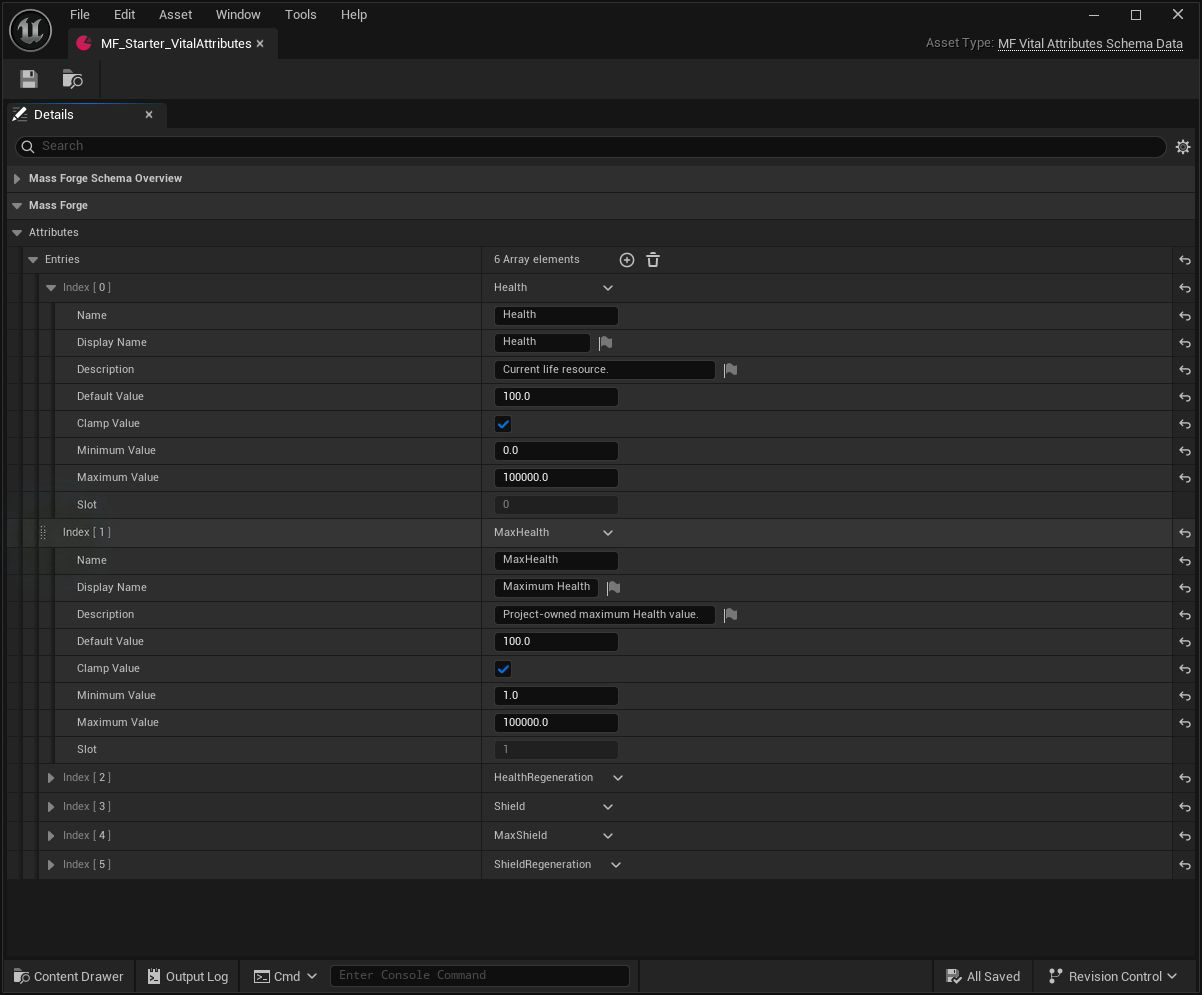
Edit the fields in the normal Details panel. The domain plus Name is persistent identity; Slot is compact runtime layout, while display name and description are designer-facing metadata.
Repair Slots (Preserve Valid)
Repair keeps every valid, unique existing slot. It assigns only missing, invalid, or colliding entries to the lowest available slot. This makes routine edits predictable and avoids needless runtime-layout churn.
Perform repair and other schema-layout work before spawning gameplay entities. Existing live fragments retain their old compact array layout; a schema refresh invalidates compiled bindings but intentionally does not guess how project-owned live entities should be rebuilt. For a running/save-loaded game, capture or retain an identity-based snapshot, recreate the affected entity after the new schema is active, and restore the snapshot. Restore resolves domain/name identities into the new slots.
Entries with an empty name or a duplicate name remain unassigned until their identity error is corrected. If the schema has more valid named entries than its domain can hold, the extra entries remain unassigned and the asset continues to report a blocking capacity error.
The repair action is undoable.
Sort Entries by Slot
Sorting changes only the order of rows in the Details panel. Assigned entries appear in ascending slot order and unresolved entries follow them. It does not change any slot number or attribute identity, and it is undoable.
Sorting is useful after repair because the authored list then mirrors the compact runtime layout.
Rename and migration rules
Changing Name or moving an attribute to another schema domain changes its persistent identity. Slot repair does not create a compatibility alias and sorting does not make a rename safe for existing saves.
For a released project with stored snapshots:
- Increment Snapshot Schema Version in Project Settings > Mass Forge > Global Attribute Schemas > Persistence.
- Create a Mass Forge Attribute Snapshot Migration Data Asset for the old version to the new version.
- Add a Rename/Move rule from the exact old domain and name to the exact new domain and name. Add an explicit Remove rule when retiring an attribute.
- Update ability, effect, damage, regeneration, derived-attribute, UI, AI, and project Blueprint references.
- Migrate old snapshots through every required version before calling restore.
- Test both a new entity and a migrated saved entity.
See PERSISTENCE_GUIDE.md for the full atomic migration and restore contract.
Configured, unambiguous schema entries automatically populate the Attribute ID picker used by gameplay Data Assets and literal Blueprint pins. Duplicate names, slot collisions, missing slots, and out-of-range slots are excluded until repaired. See BLUEPRINT_AUTHORING_GUIDE.md.
Release checklist
- Every entry has a unique, stable name.
- Every valid entry has one unique in-range slot.
- The authored row count is within the domain capacity.
- Defaults and clamp bounds are finite; every minimum is less than or equal to its maximum.
- Intended defaults lie inside their clamp range.
- The capacity meter leaves enough room for the project's planned expansion.
- Intentional renames or removals have a schema-version bump and migration asset.
- All dependent Data Assets and Blueprints have been updated.
- Content validation, automation tests, and a packaged build pass.