
Appearance
Gameplay asset authoring
Mass Forge adds a live Mass Forge Authoring Overview to every Mass Forge Instant Effect, Mass Forge Persistent Effect, Mass Forge Ability, and Mass Forge Ability Execution Plan Data Asset. It keeps the normal Unreal Data Asset editor and property controls while adding the product-specific information designers need beside them.
Project-specific read-only admission rules are covered by the ability condition extensions guide. Condition assets appear as searchable outgoing dependencies of each Ability that uses them.
Project-owned damage, healing, and scaling formulas are covered by the custom effect magnitude calculations guide. Assigned calculation assets appear as searchable outgoing dependencies of Instant and Persistent Effects.
Dynamic effect selection is covered by the ability execution plans guide. Ability-to-plan and Static-plan-to-effect relationships appear as searchable outgoing dependencies.
Live authoring status
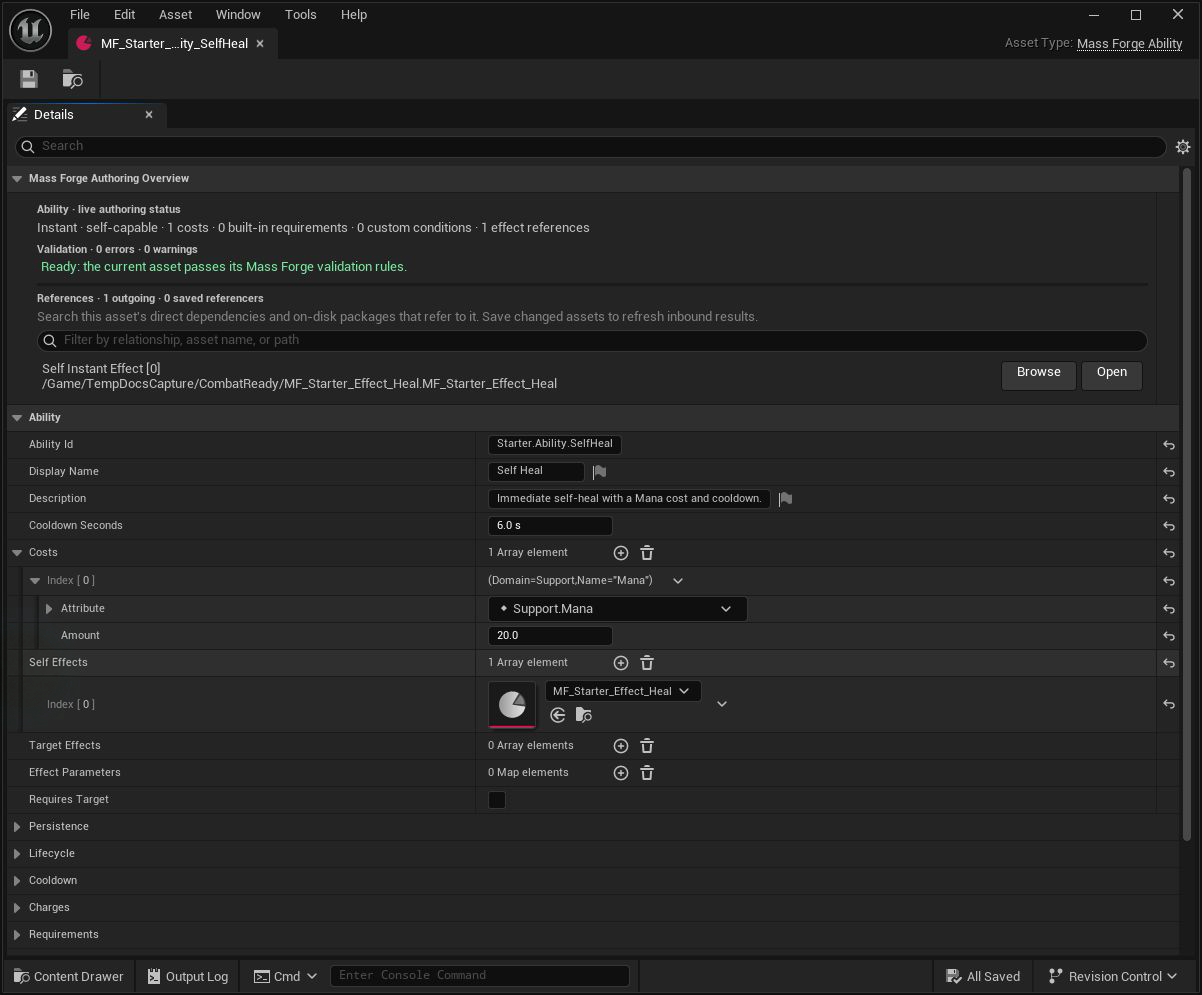
The overview makes readiness and dependencies visible above the ordinary properties. Here the ability validates cleanly and links directly to its Heal effect while the cost and cooldown remain editable below.
The overview updates when an editable property or array child changes. It shows:
- The asset kind and a compact execution summary.
- Every current Mass Forge validation error and warning inline.
- A green readiness message when the asset passes its current validation rules.
- Direct dependencies such as an Ability's targeting policies/execution plan/effects, a Static plan's phase payloads, a Persistent Effect's periodic Instant Effect, or a modifier's custom magnitude calculation.
- Saved assets that refer to the open asset according to Unreal's Asset Registry.
Inline results use the same IsDataValid contract as Unreal content validation. The overview is fast feedback during authoring; teams should still run their normal Validate Assets and packaged-build gates before release.
Searchable references
Use the reference search field to filter by relationship, asset name, or object path. Each resolved row has:
- Browse to select the asset in the Content Browser.
- Open to open it in its editor.
Outgoing references reflect the open in-memory asset immediately. Inbound Referenced By (saved asset) rows come from on-disk Asset Registry dependencies. Save changed assets before relying on the inbound list. The panel bounds inbound output to 128 rows so an unusually connected asset cannot make the Details view unresponsive.
An Instant Effect with no custom calculations normally has no outgoing asset dependencies, but its inbound list is particularly useful for finding Abilities and Persistent Effects that consume it.
Instant Effect workflow
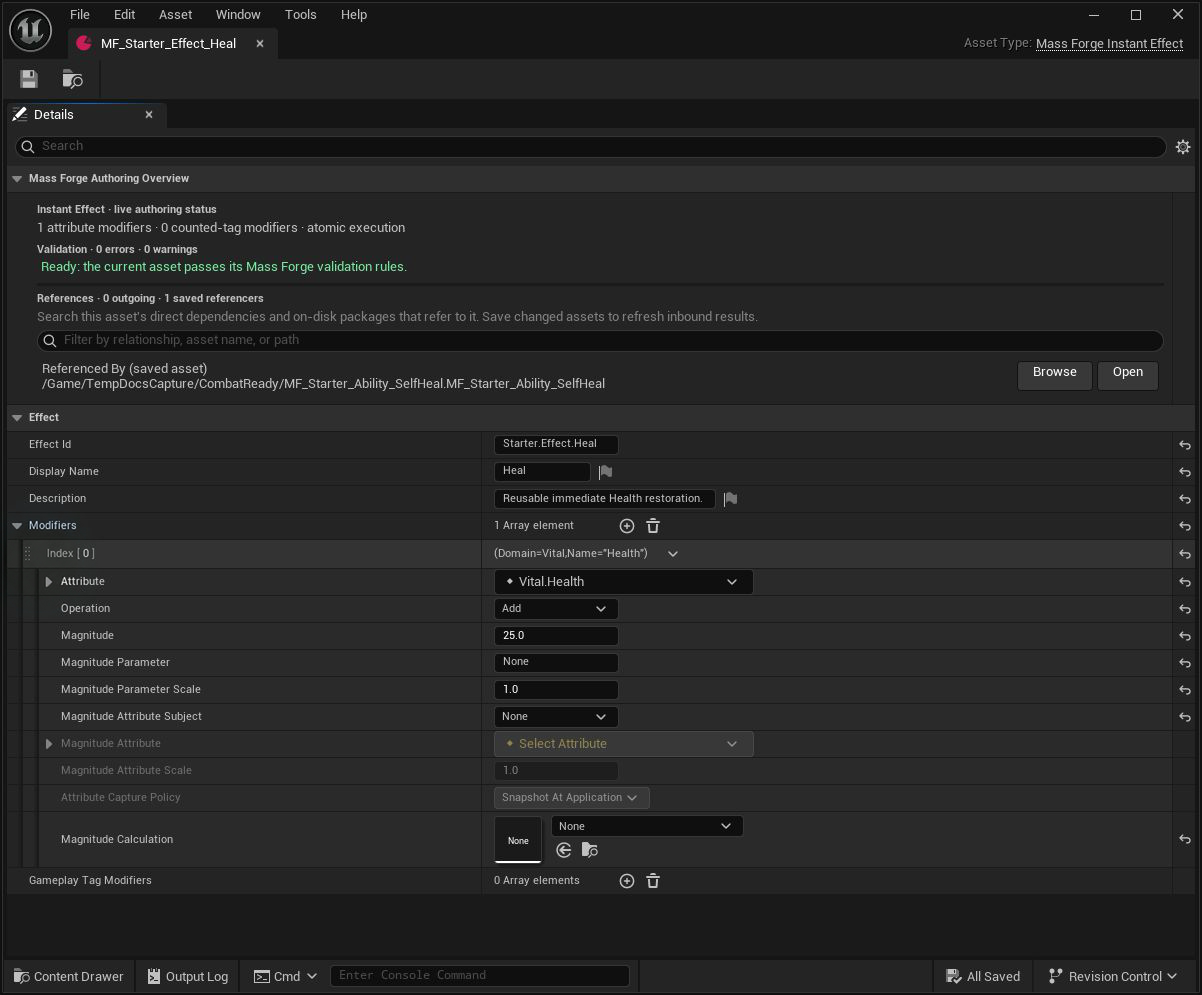
The reference row answers “what uses this?” while the modifier shows exactly what will change. Both are visible in the same standard Data Asset editor.
- Assign a stable
EffectId. - Add at least one attribute modifier or counted Gameplay Tag modifier.
- Optionally assign a validated custom magnitude calculation after configuring base, parameter, and captured-attribute contributions.
- Resolve every inline error, including invalid identities, tags, counts, captured-attribute pairs, calculation references, and non-finite values.
- Save the asset, then review its inbound referencers before changing behavior used by other assets.
- Validate the asset and exercise its intended direct, queued, or cross-ownership route.
Persistent Effect workflow
- Assign a stable
EffectIdand choose the lifetime and stacking policies. - Configure lifecycle tags and/or reversible attribute modifiers; optional custom magnitudes are evaluated and snapshotted once per admitted contribution.
- For periodic behavior, set a valid positive period and choose a configured Instant Effect.
- Use the reference row to open the periodic effect and verify its atomic payload.
- Resolve all lifetime, stacking, capacity, tag-overlap, modifier, and period diagnostics before use.
Ability workflow
- Assign a stable
AbilityIdand choose Instant, Cast, or Channel execution. - Configure costs, requirements, targeting policies, target rules, cooldowns, and charges.
- Add activation and channel effects in the intended source/target collections.
- Supply every context parameter required by referenced Instant and Persistent Effects in
EffectParameters. - Use the dependency rows to inspect every referenced policy/effect without searching the Content Browser manually.
- Resolve all inline errors and warnings, then save and validate the complete dependency chain.
The Ability validator loads configured effect dependencies to detect missing parameter defaults. This catches a common integration failure before a runtime activation request can encounter it.
Ability Execution Plan workflow
- Assign a unique
PlanIdand choose Append or Replace merge behavior. - Prefer Mass Forge Static Ability Execution Plan when separate fixed activation/channel payloads are sufficient.
- Derive a Blueprint/C++ plan only when output must depend on the supplied read-only query.
- Keep target-producing plans on Abilities with Requires Target, keep channel payloads Instant-only, and stay within 64 effects and 64 parameters.
- Confirm the overview resolves every phase-specific effect dependency and Project Health reports no duplicate plan ID.
Identity and change discipline
AbilityId and EffectId are gameplay identities used in runtime results, events, inspection, and Primary Asset IDs. Treat released IDs as stable even though Unreal object references can survive an asset rename. Before changing an ID, audit Blueprint logic, AI, UI, telemetry, save data, and project code that may compare or store it.
Release checklist
- The overview reports zero errors on every shipped Ability, Execution Plan, Instant Effect, and Persistent Effect.
- Warnings have been reviewed and intentionally accepted or corrected.
- Every outgoing dependency resolves and opens.
- Changed assets were saved before reviewing inbound referencers.
- Referencer assets were checked for behavior changes caused by the edit.
- Ability effect parameters cover every parameterized referenced modifier.
- Every assigned magnitude calculation resolves, has a unique stable ID, returns finite results, and has failure-path coverage.
- Every assigned execution plan resolves, has a unique stable ID, stays bounded, and has preflight, commit, and channel-pulse failure coverage where applicable.
- Content validation succeeds for the full asset folder.
- Runtime automation, representative gameplay scenarios, and packaged builds pass.