
Appearance
Instant effects
For Entity-to-Entity, Actor-to-Entity, Entity-to-Actor, and Actor-to-Actor routing recipes, see the combat and cross-ownership effect guide.
Mass Forge Instant Effect Data Assets are reusable, game-agnostic transactions for immediate attribute and counted Gameplay Tag changes. They work on actorless Mass entities, represented entities, queued callers, and ability self/target effect lists.
Opening the asset shows live validation plus searchable saved referencers, making it easy to audit every Ability or Persistent Effect affected by a change. See GAMEPLAY_ASSET_AUTHORING_GUIDE.md.
Create an effect
- Create a Mass Forge Instant Effect Data Asset.
- Assign a stable
EffectId; this becomes its Primary Asset identity and the fallback mutation source. - Add one or more attribute modifiers, Gameplay Tag modifiers, or both.
- Apply it directly while Mass is idle, queue it when work can overlap Mass processing, or reference it from a Mass Forge Ability.
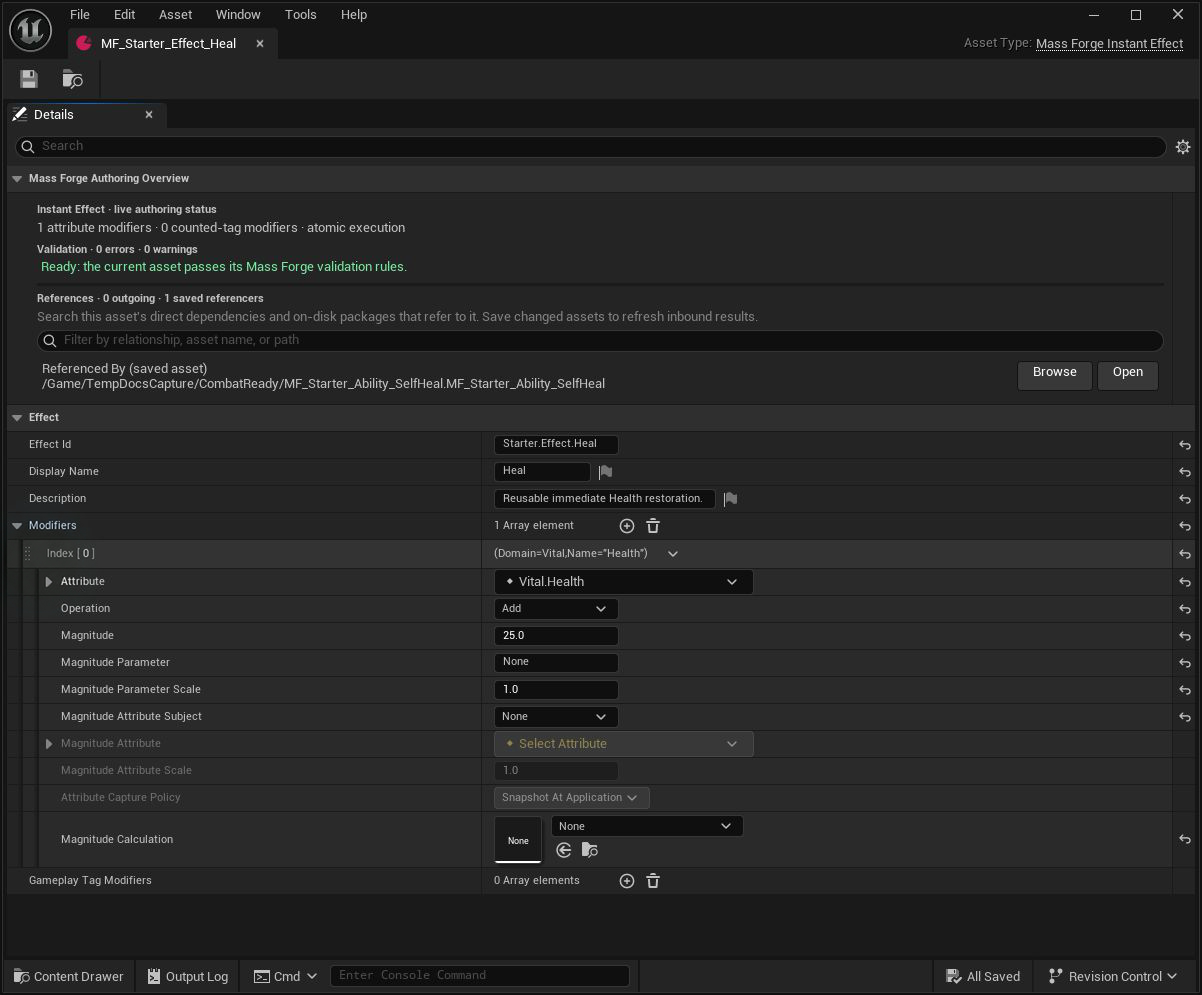
This reusable effect adds 25 to Vital.Health. The schema clamps the result, and the inbound reference shows that the generated Self Heal ability consumes this asset.
An asset with neither kind of modifier is invalid. Editor validation also rejects unnamed attributes, non-finite magnitudes or scales, invalid tags, and tag counts outside 1–255.
Attribute modifiers
Each entry selects an attribute domain and stable name, then applies one operation in authored order:
- Set replaces the working value.
- Add offsets the working value. Negative values are suitable for damage or resource spending.
- Multiply scales the working value.
The target schema clamps every intermediate result. Multiple entries may address the same attribute; each later entry observes the prior entry's projected value.
An optional magnitude parameter resolves as:
Magnitude + Context Parameter × Magnitude Parameter Scale
Context-aware calls supply parameters at runtime. Ability assets provide defaults through EffectParameters. A missing or non-finite parameter rejects the whole transaction and returns its name.
An optional source- or target-attribute term extends that formula:
Magnitude + Parameter Term + Sampled Attribute × Magnitude Attribute Scale
Source reads Context.SourceEntity; Target reads the effect recipient. For an immediate Instant Effect, both capture policies sample once at the start of that atomic execution. When the Instant Effect is used as a Persistent Effect pulse, Snapshot At Application freezes the value when the persistent instance is created, while Evaluate On Execution reads the current value before every pulse. All operations in one atomic instant/ability transaction sample the pre-commit attribute state rather than observing earlier projected writes.
Snapshot contexts are bounded to 32 unique subject/attribute pairs. Invalid entities, missing schemas/fragments, unknown attributes, non-finite values, and missing source context fail explicitly and identify the capture subject and attribute.
Gameplay Tag modifiers
Each entry selects an exact project Gameplay Tag, Add Count or Remove Count, and a count from 1 to 255. Entries run in authored order against projected tag state.
Adding a new tag needs one of the entity fragment's 32 slots. Adding an existing tag increments its count up to 255. Removing requires the complete requested count; removing the final count releases the slot. The effect result distinguishes invalid tags/counts, missing Gameplay Tag Trait, absent tags, insufficient counts, overflow, and full capacity.
The plugin does not define game-specific tags. Define them in the project's normal Gameplay Tags dictionary and add Mass Forge Gameplay Tag Trait to every entity that may receive tag modifiers.
Atomic transaction contract
Mass Forge validates and calculates every attribute and tag operation before changing fragment state. If any operation fails:
- no attribute value changes;
- no tag count changes;
- the returned
ChangesandGameplayTagChangesarrays are empty; - no attribute, tag, or successful-effect event is published.
On success, all fragment state is committed before listeners run. Changes and GameplayTagChanges preserve authored operation order and report previous/new values or counts. Attribute changes publish OnAttributeChanged; tag changes publish OnGameplayTagChanged; the complete transaction then publishes OnInstantEffectApplied.
Ability costs, self effects, and target effects extend the same atomic boundary. A tag failure returns Gameplay Tag Effect Failed, the failed tag, its source/target subject, and the detailed tag result. The ability system restores any reserved individual cooldown, shared cooldown, and charge state.
This scope covers one Instant Effect recipient. Separate effect calls—even consecutive queued calls—are independent transactions. For the source-plus-one-target ability boundary, multi-target partial-success rule, ordinary Actor limitation, and re-entrant listener guarantees, see the transaction and event contract.
Blueprint entry points
Apply Mass Forge Instant Effectapplies immediately with a simple source name.Apply Mass Forge Instant Effect With Contextcarries source/target entities and Actors, source identity, origin, and scalar parameters.Queue Mass Forge Instant Effectaccepts work for the next safe world tick and returns a request ID; observeOnInstantEffectRequestCompleted.- Queued Instant Effects run after queued raw attribute changes and before queued damage, death handling, and abilities; see the deferred command contract.
Dispatch Mass Forge Instant Effect To Actorapplies to a represented Mass entity or calls the generic Mass Forge Effect Receiver interface on an ordinary Actor.
Direct entity application returns Gameplay Tag Failure for a tag-operation rejection. Read GameplayTagResult and FailedGameplayTag for the exact cause. Successful tag details are in GameplayTagChanges.
Example recipes
- Damage plus state: add
-25to VitalHealthand add one project-definedState.Hittag. - Healing and cleanse: add
+40to VitalHealthand remove oneState.Debuff.Poisonedcount. If the target is not poisoned, the heal also rolls back; use two effects when independent success is desired. - Ability mark: create a tag-only effect that adds
State.Target.Marked, then place it in an ability's target effects. - Resource conversion: subtract from one attribute and add to another in the same effect, ensuring neither side can commit alone.
Current scope
Instant effects are immediate transactions. Wrap one in a Mass Forge Persistent Effect for finite or infinite periodic execution, application-time or live source/target capture, lifecycle-granted tags, immunity gates, classification cancellation, persistent attribute aggregation, and configurable independent, capped, refresh, extend, replace, or strongest-wins behavior; see PERSISTENT_EFFECTS_GUIDE.md. Multiplayer mutations use the owner-bound authority request layer and authoritative state stream. Prediction remains presentation-only for Ability activation; direct Instant Effects are never silently predicted.