
Appearance
Blueprint-only quick start
This tutorial takes a new project from installation to a working Mass Forge attribute, deterministic damage, healing, and an ability without C++. It also shows the production-safe queued form and the adapter used when a player remains an ordinary Actor.
The examples use Vital.Health, Vital.MaxHealth, and Support.Mana because the Entity Config wizard creates those starter entries. They are editable examples rather than required Mass Forge names.
Blueprint-first path
Everything in this learning slice is implemented with public Blueprint nodes and editable Data Assets. The plugin supplies safe Mass operations; your project still owns combat rules, input, UI, AI, representation, and game-specific progression.
Before rebuilding this tutorial, enable Show Plugin Content, open /MassForge/L_MF_BlueprintQuickStart, and inspect its placed BP_MF_BlueprintQuickStart__OPEN_ME actor. The Blueprint at /MassForge/BlueprintExamples/Blueprints/BP_MF_BlueprintQuickStart provides a numbered reference for the exact public nodes, distinct source/target handles, visible snapshot-driven projectile, 27 editable Data Assets, and four material instances used below (32 assets total). Copy it into project Content before making changes; treat the plugin-owned graph as a versioned reference.
Press Play in the shipped learning map to exercise the graph repeatedly:
- Left Mouse Button launches a visible Mass-owned projectile; its damage commits only when impact resolves.
- 1 activates the granted self-heal ability.
- H applies the reusable healing Effect to the target.
- R destroys the generation-checked target and spawns a fresh target, demonstrating handle replacement.
The saved map includes a Player Start and a warning-free Quick Start GameMode. The camera is owned by the teaching Blueprint, the target begins at 100 Health, and no projectile or damage runs automatically. The target disappears only after its real entity Health reaches zero; R creates a visible replacement at 100 Health.
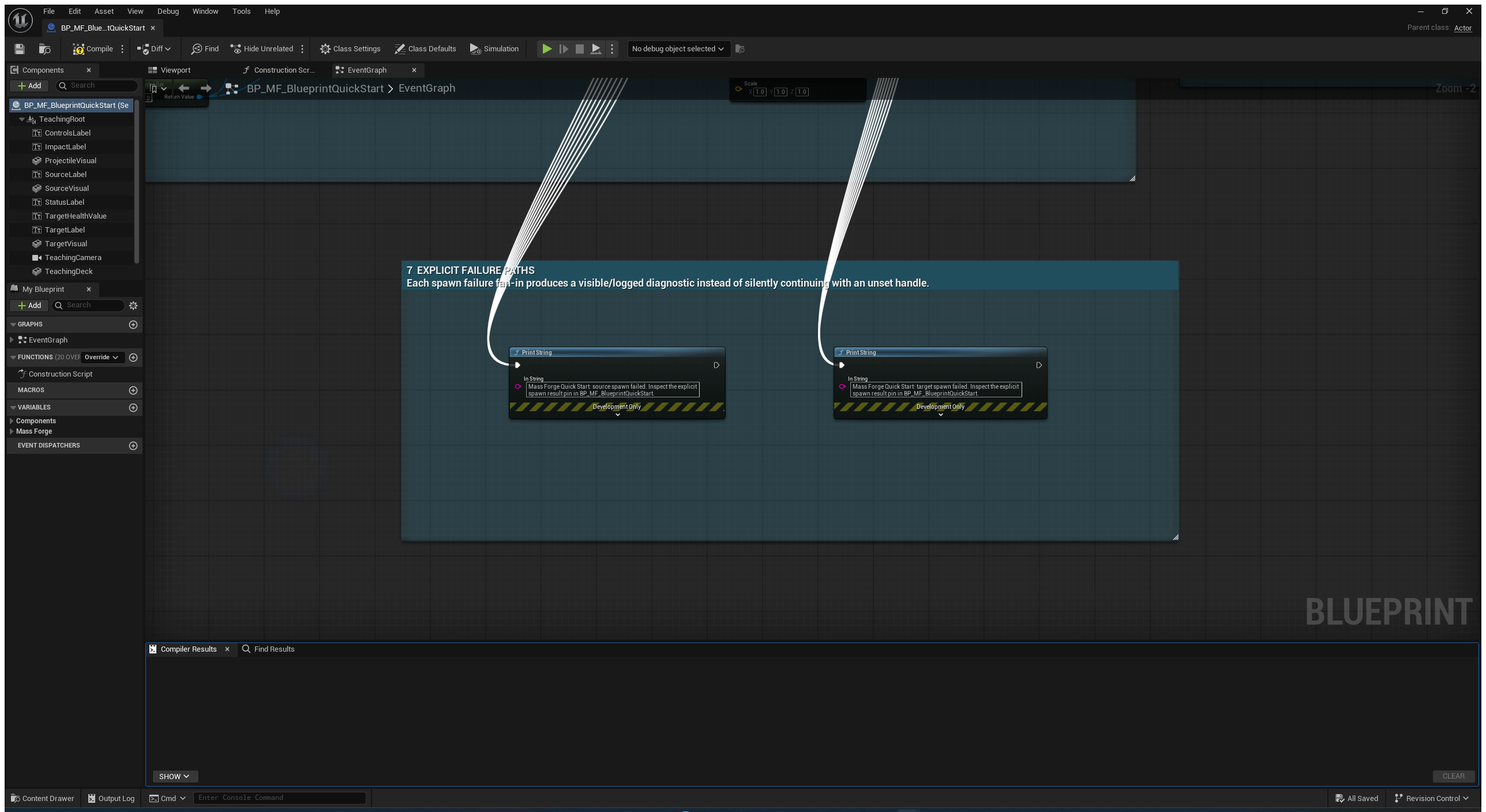
The actor enables input in its own Blueprint Event Graph. Its source and target spawn failure pins are connected to visible/logged diagnostics, so a broken setup does not silently continue with an unset handle.
The target's floating Health label is read from the real actorless Mass entity on Tick. It is not a duplicated UI variable. This keeps the visible projectile, impact-driven damage, healing, and respawn path auditable in one small Blueprint-owned scene.
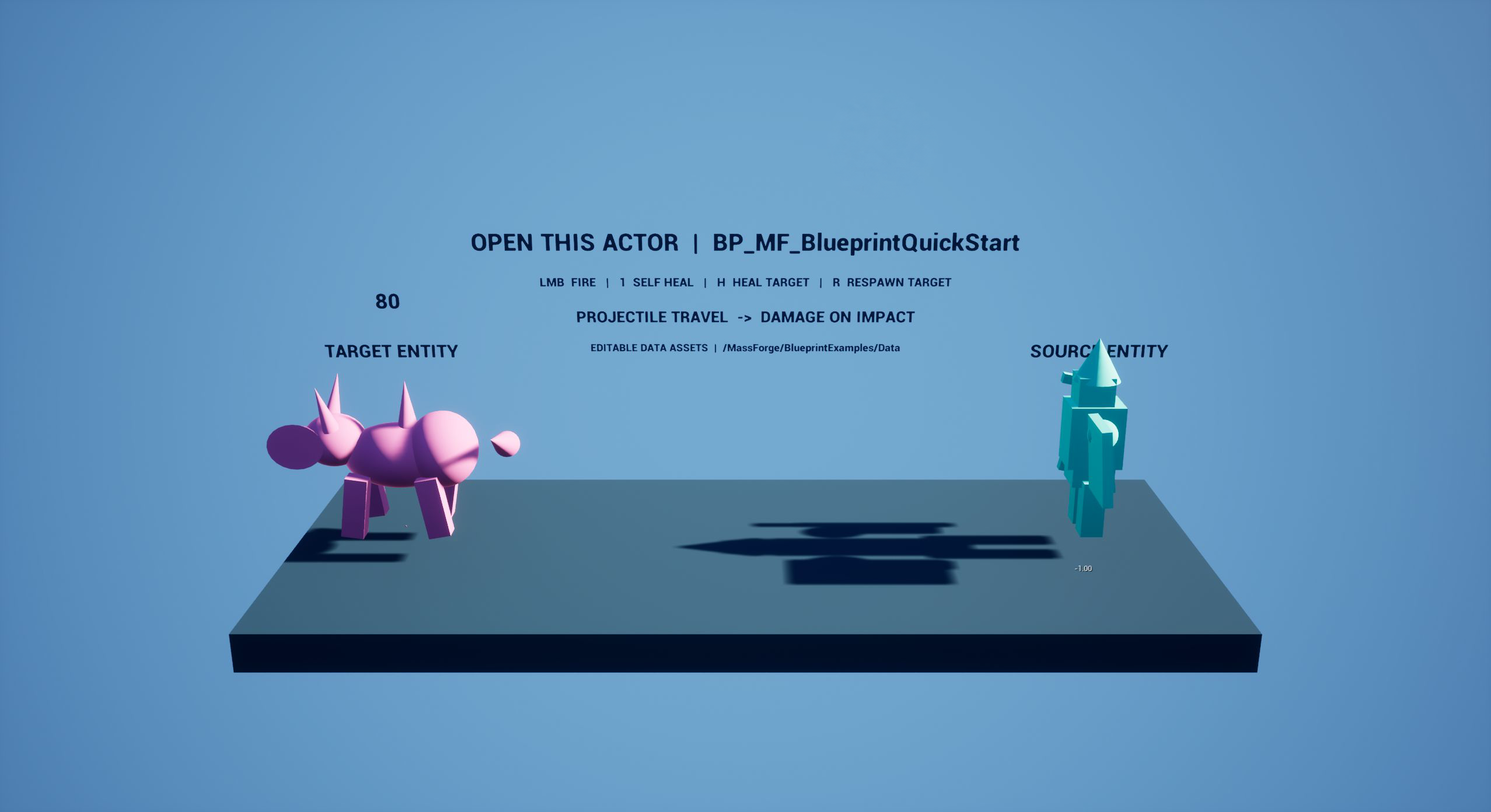
This is the result of one real projectile impact: the target began at 100 Health, the visible projectile traveled, and the floating value now reads the entity's authoritative 80 Health. Press H to heal or R to replace the exact target handle.
The teaching deck below is serialized in the plugin map before Play: the Outliner contains the Blueprint gameplay actor, Player Start, and authored lighting actors. Runtime behavior updates this existing scene; it does not secretly construct a different showcase world in BeginPlay.
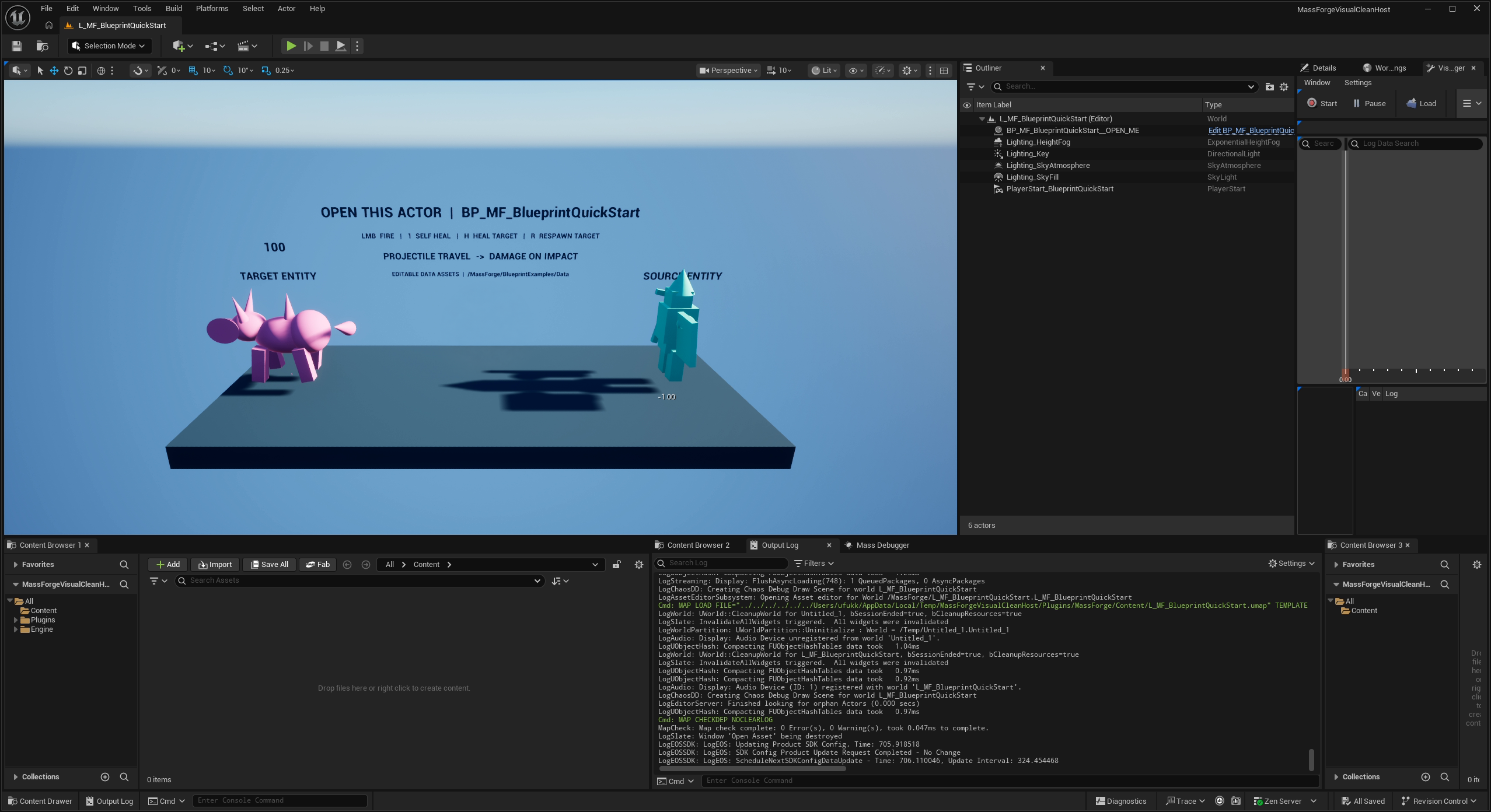
Read the shipped Event Graph
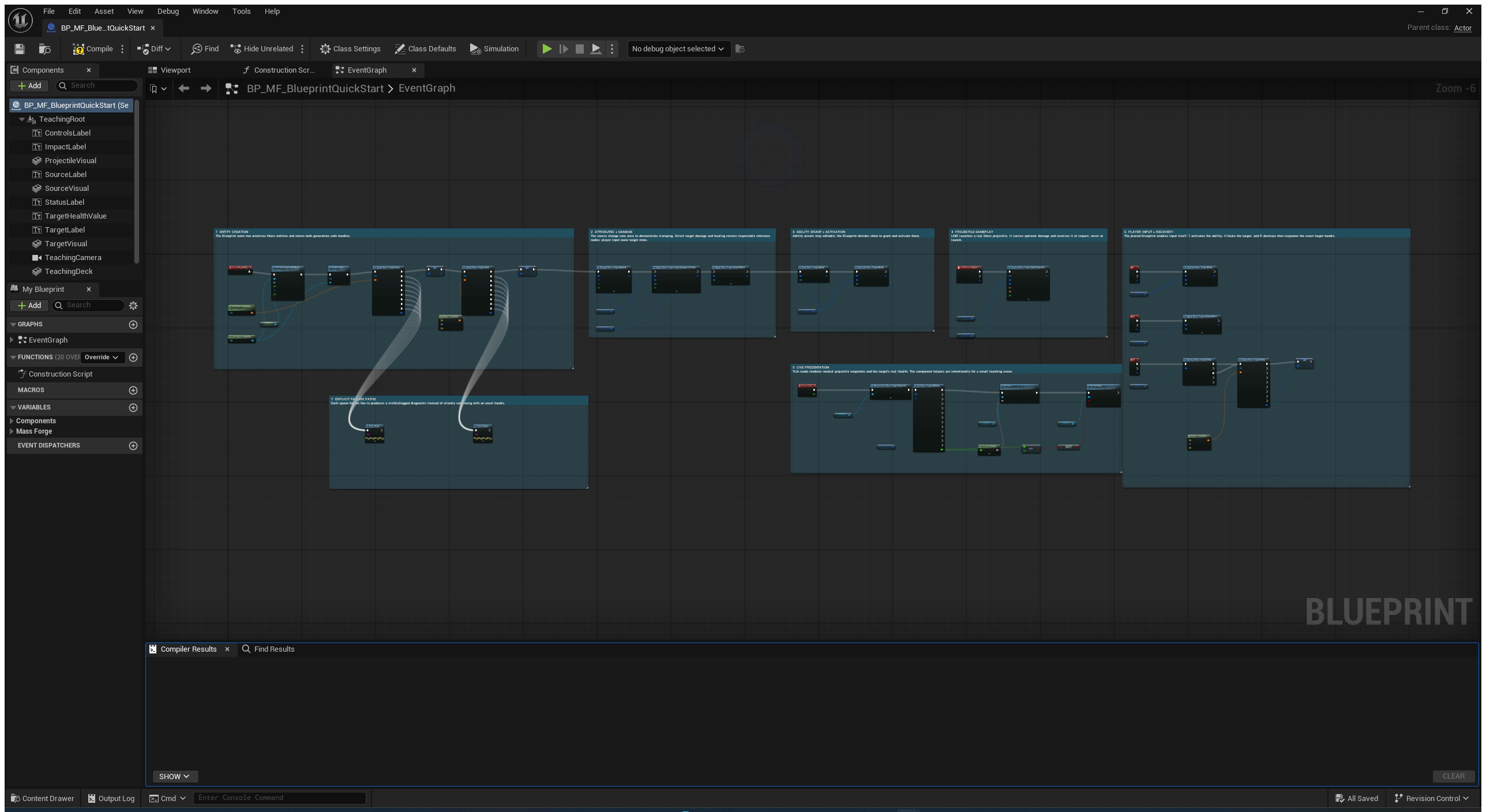
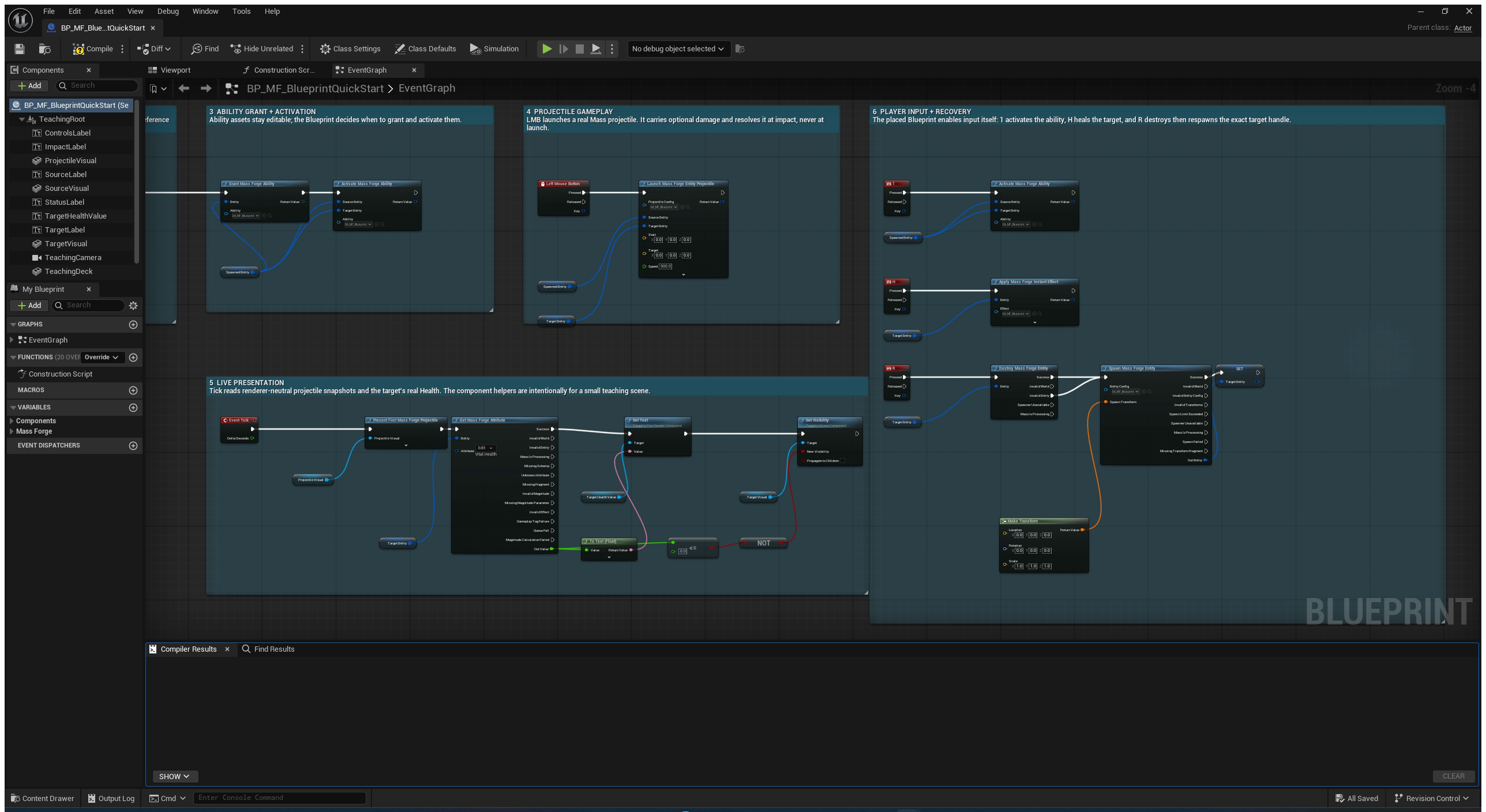
The complete graph is intentionally divided into seven numbered stations. The overview shows the whole ownership flow; the closer views keep real node names, asset pins, handle wires, and execution order readable.
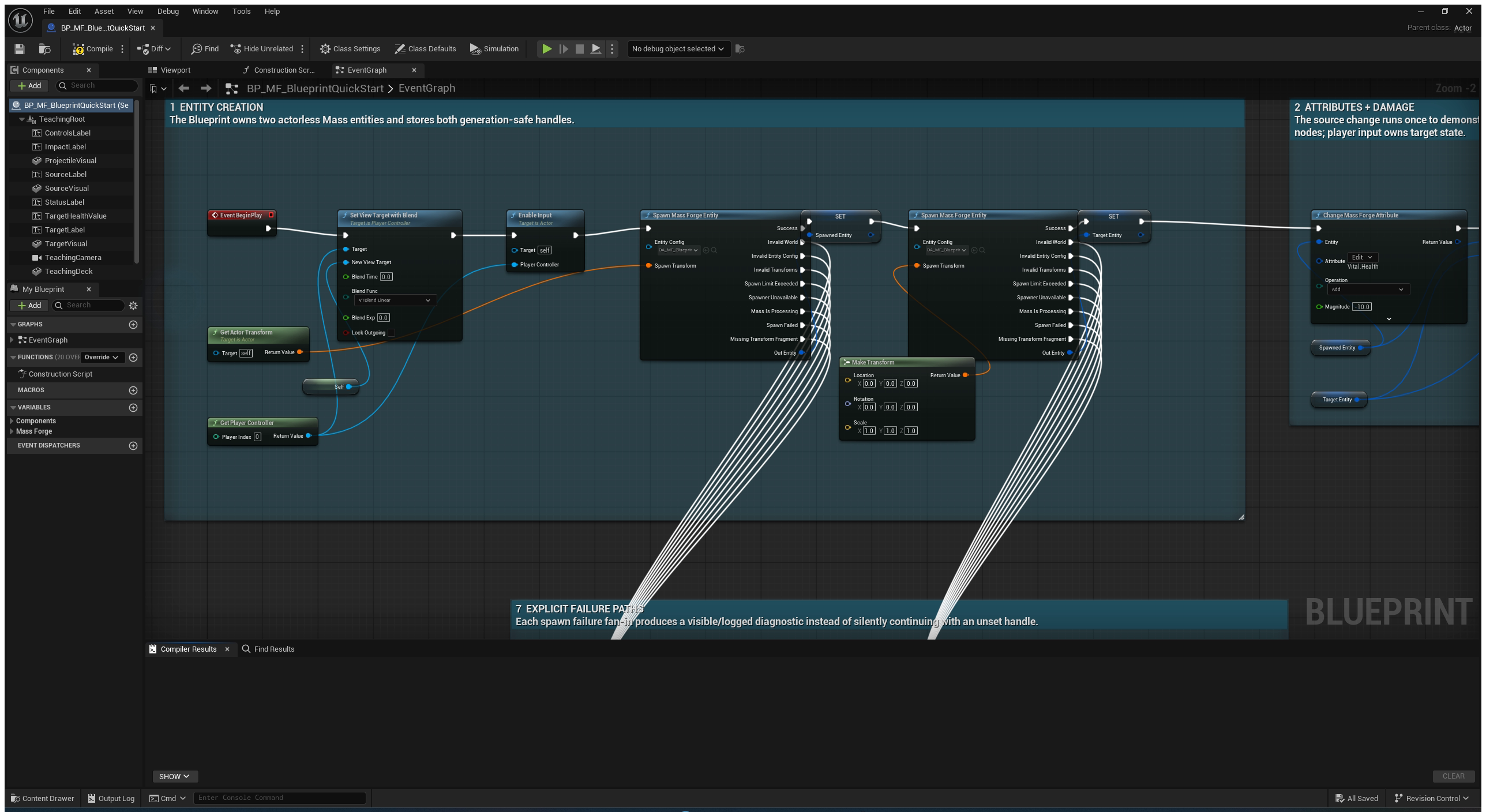
Station 1 owns two actorless entities and stores their complete generation-safe handles. Both spawn nodes expose every failure result instead of converting setup failure into an unset handle.
Stations 2–4 demonstrate a direct attribute change, entity-to-entity damage, reusable healing, ability grant/activation, and a Mass-owned projectile whose optional damage resolves at impact.
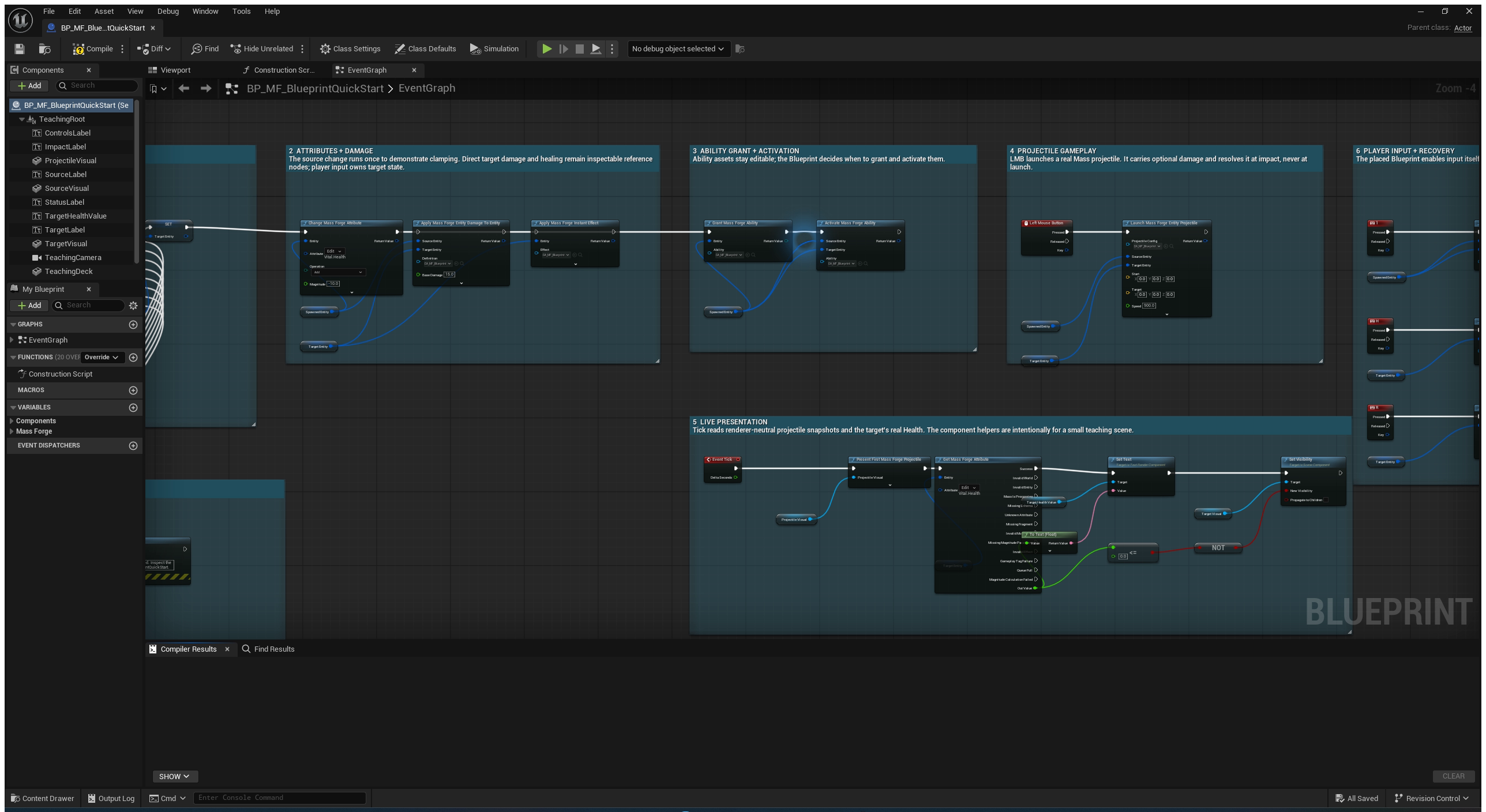
Stations 5–6 keep presentation separate from authority: Tick reads renderer-neutral snapshots and real Health, while input launches the ability/effect/projectile actions and replaces the exact destroyed target handle.
Station 7 makes spawn failure visible in the viewport and log. It is deliberately separate from the success chain so a tutorial user can inspect and extend the recovery policy without touching gameplay authority.
Five-minute first attribute
1. Install and enable
- Close Unreal Editor.
- Copy the distributed
MassForgefolder into the project'sPluginsfolder. - Open the project in Unreal Engine 5.6, 5.7, or 5.8 on Win64.
- Enable Mass Forge under Edit > Plugins, then restart when prompted.
If the plugin does not load, confirm that MassForge.uplugin is directly inside Plugins/MassForge, not inside a second nested MassForge folder.
2. Generate the starter package
- Open Tools > Mass Forge Entity Config Wizard.
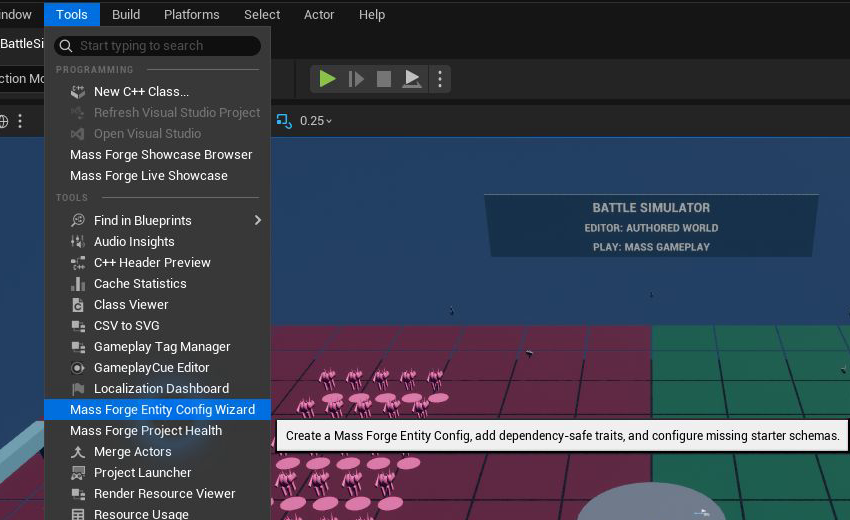
Open the standard Unreal Tools menu and choose the highlighted Mass Forge entry. This is an editor authoring tool; it does not run during the game.
- Select Combat Ready.
- Keep Create and configure missing starter schemas enabled.
- Choose a project-owned folder such as
/Game/Combat/MassForgeand a base name such asSoldier. - Select Create Entity Config Package.
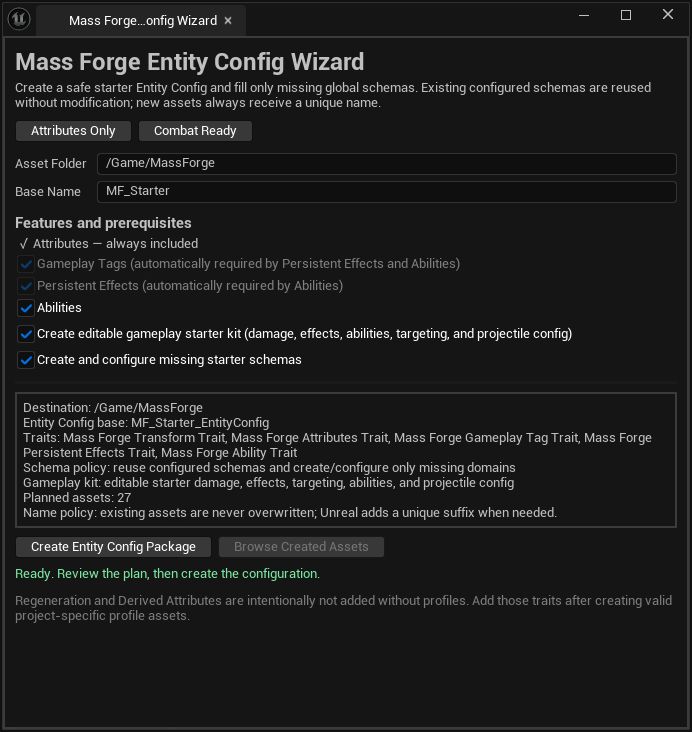
The live plan names every trait, schema, and gameplay asset that will be created. Change the folder and base name before pressing Create Entity Config Package; existing assets are never overwritten.
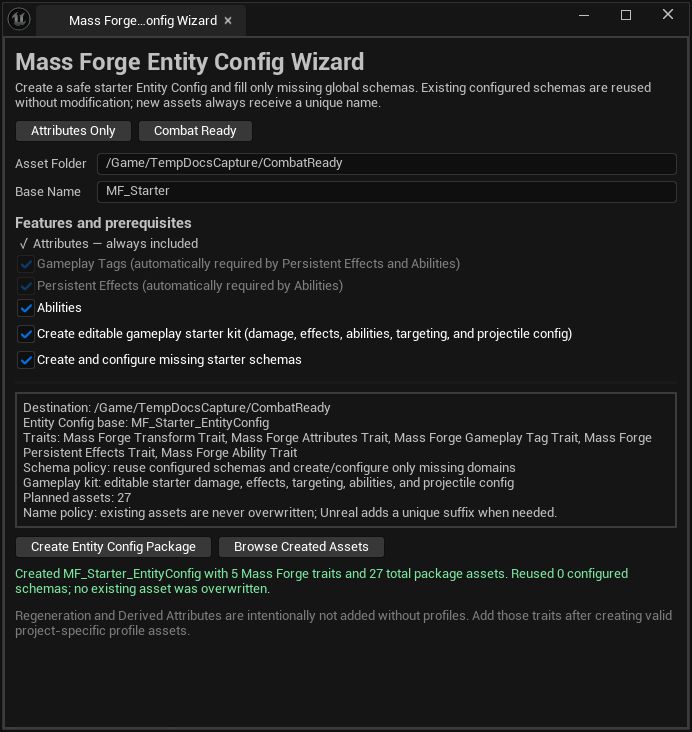
After generation, read the green result before continuing. This run created one Entity Config with five Mass Forge traits plus 27 editable package assets and did not overwrite existing content.
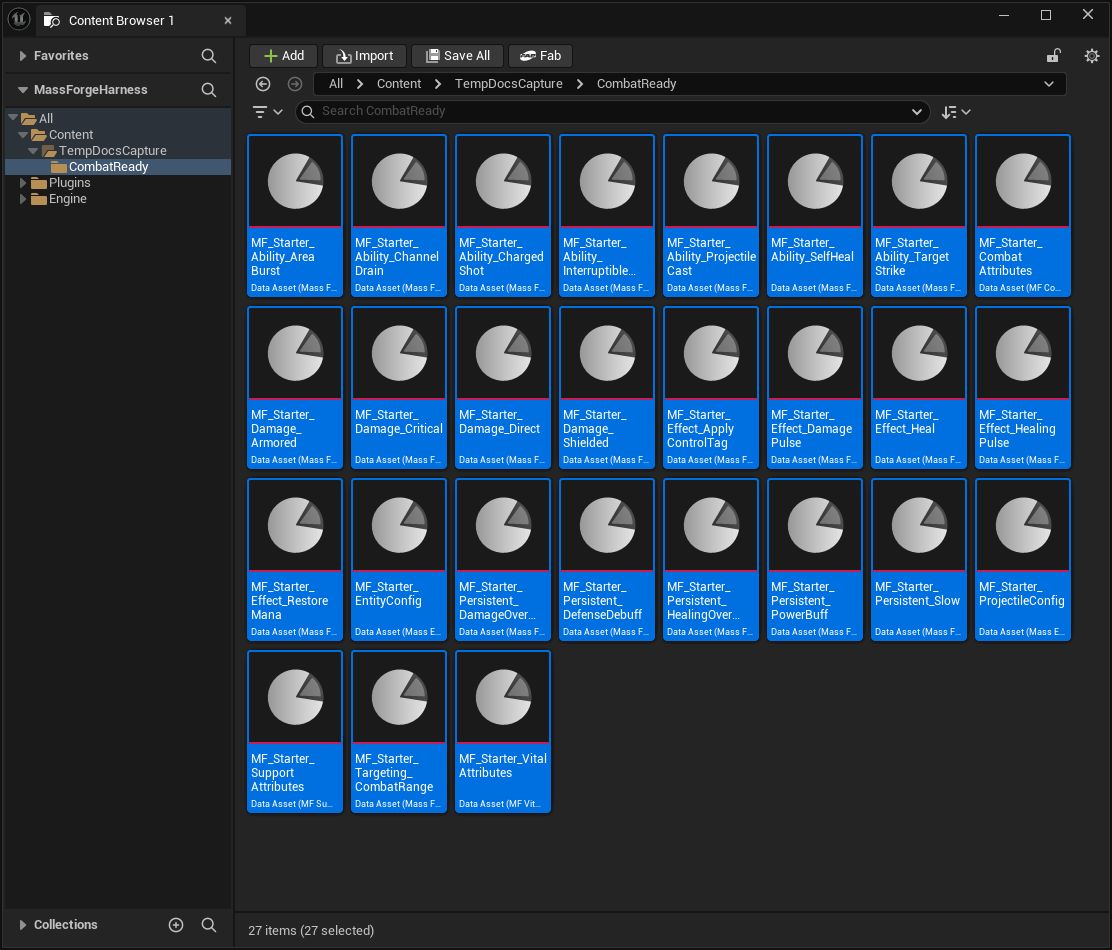
The wizard selects the complete result in the Content Browser. These are ordinary project-owned Data Assets: inspect, duplicate, rename, or replace them to fit the game.
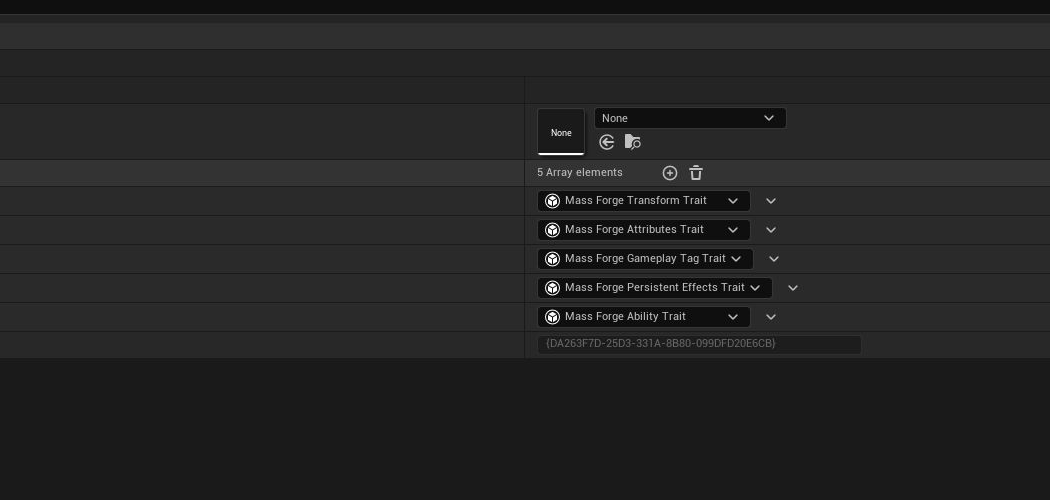
Open the generated Entity Config and confirm these five traits before spawning. They provide transform storage plus the attribute, tag, persistent-effect, and ability fragments used by this tutorial.
The wizard creates an ordinary Mass Entity Config plus any missing Vital, Combat, and Support schemas. It never overwrites an existing asset and reuses schemas already configured in Project Settings > Mass Forge > Global Attribute Schemas.
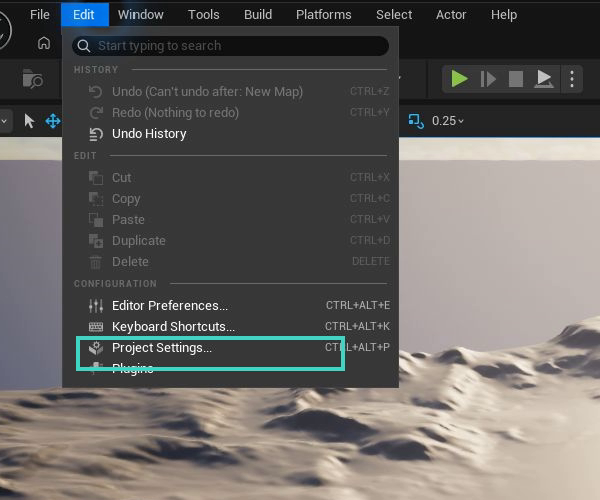
Open Edit > Project Settings to verify the project-wide schema assignments after generation.
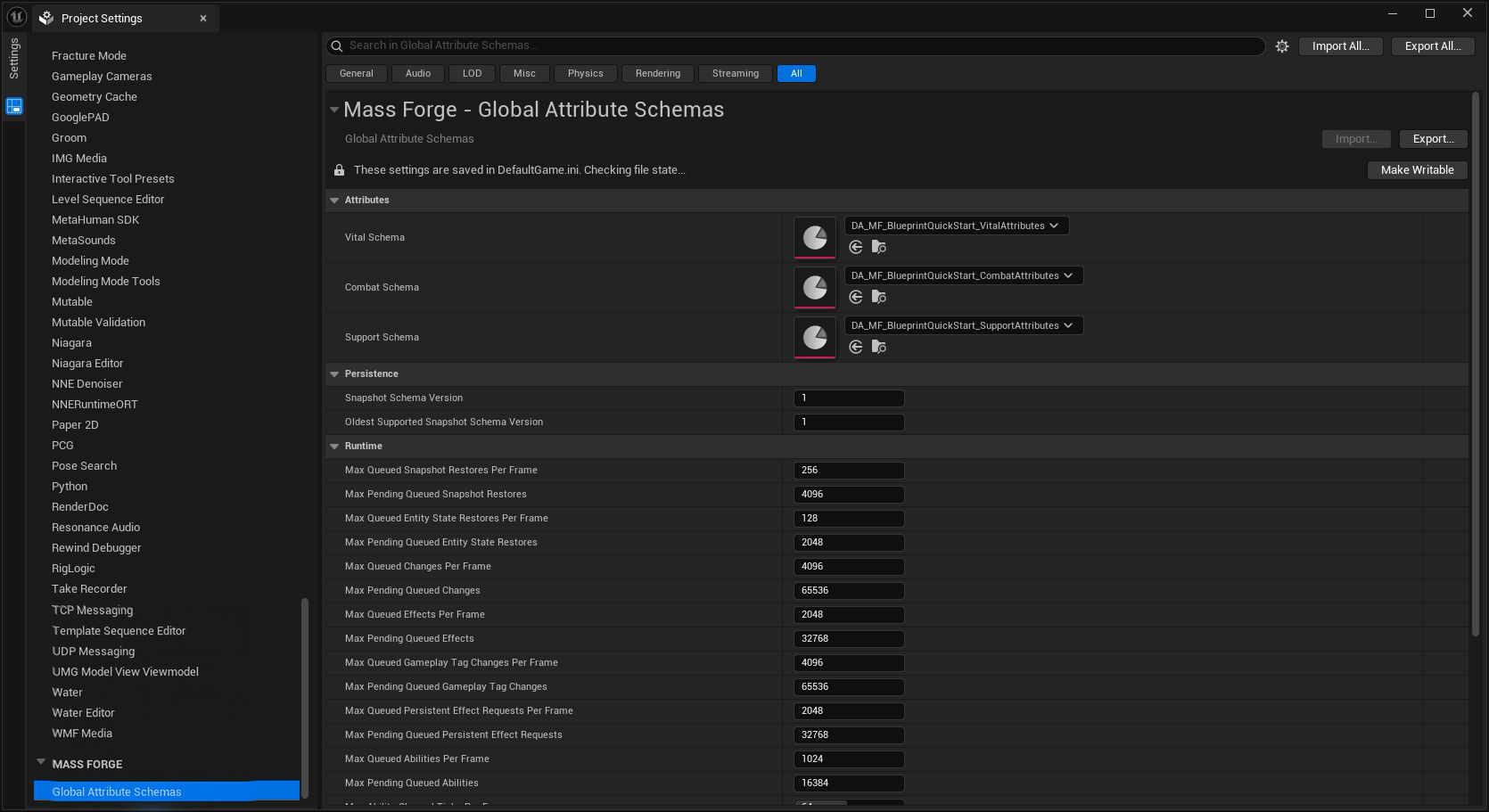
All three schema domains must point to the intended project assets. The runtime limits below them are advanced capacity controls; leave the defaults unchanged for this first workflow.
Open the generated Vital and Support schemas. Their overviews should show unique, in-range slots and no blocking diagnostics. For this tutorial, confirm that Vital.Health, Vital.MaxHealth, and Support.Mana exist. Change their defaults and bounds now if the project's units differ from the starter values.
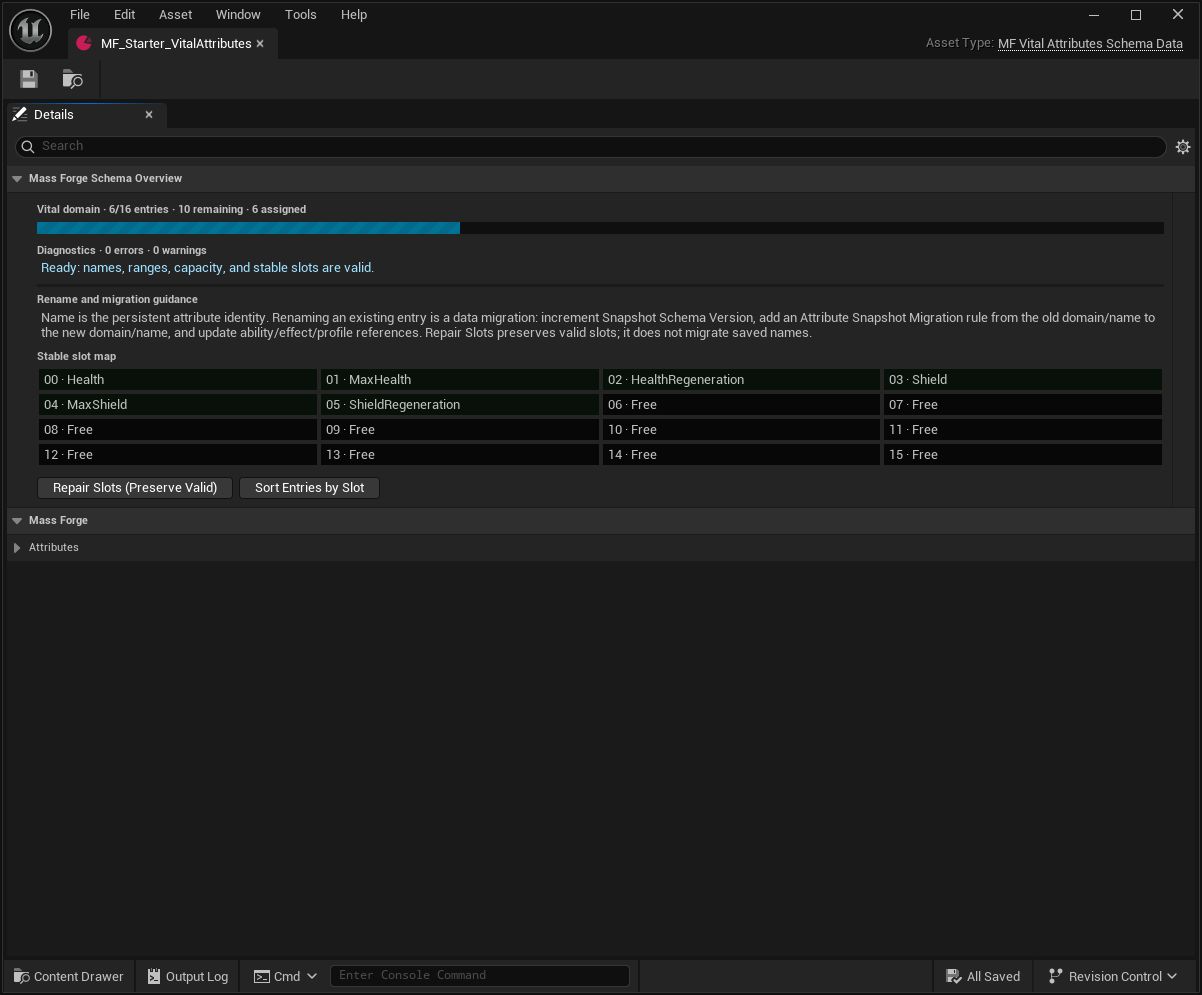
The overview is the fast safety check: zero errors, zero warnings, unique slots, and remaining capacity. Repair identity or slot problems here before building dependent assets.
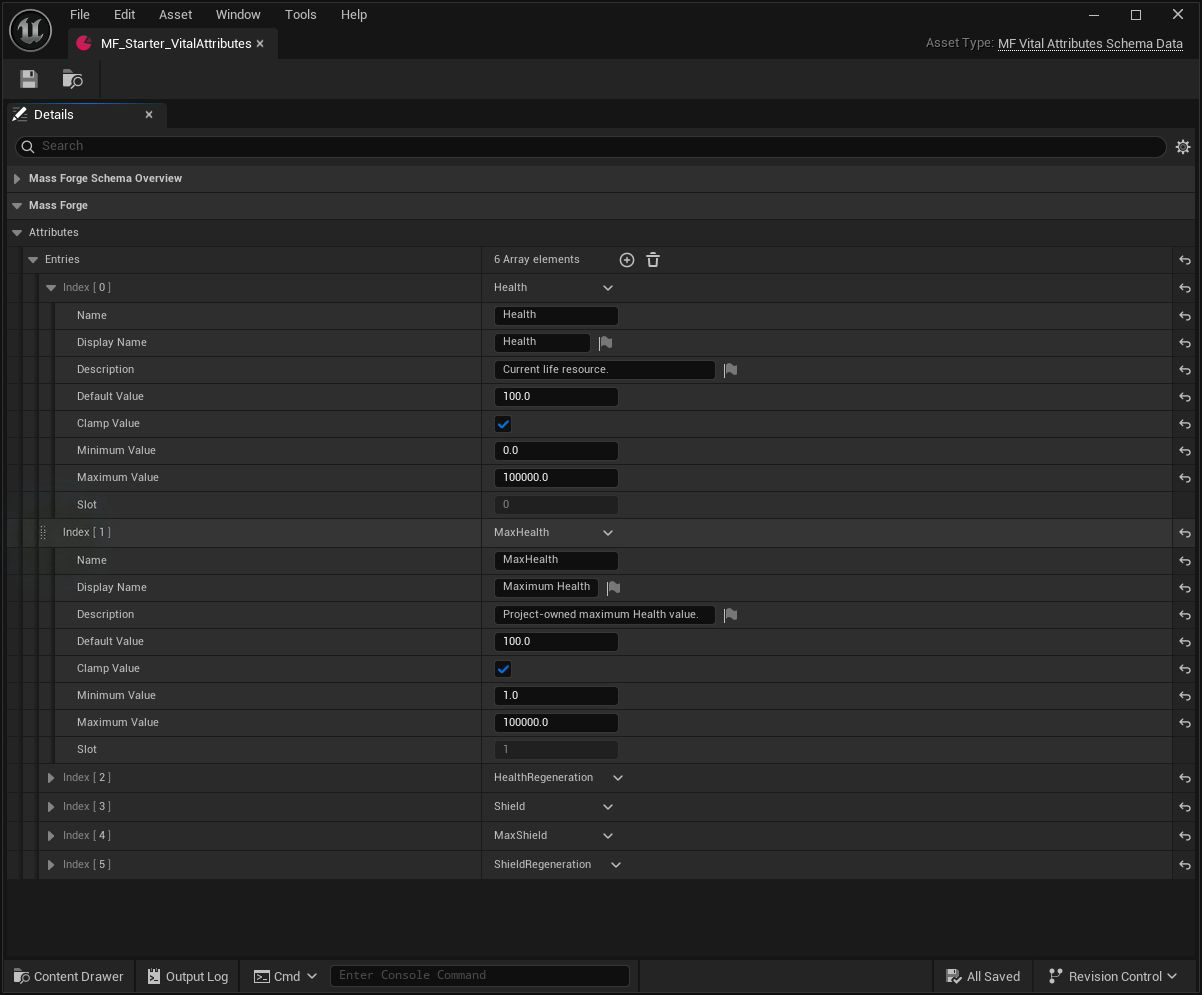
Expand the entries to author real project values. Health is the current resource in slot 0; MaxHealth is a separate project-owned capacity in slot 1, not a hidden automatic binding.
3. Spawn and resolve an entity
Call Spawn Mass Forge Entity with the generated Entity Config and a world transform. The generated config includes Mass Forge Transform Trait, so the node returns a generation-safe handle on its Success execution pin. Use Spawn Mass Forge Entities with an array of transforms for a bounded Blueprint batch. Blueprint batches are capped at 10,000 returned handles; use a project C++ population path for larger allocations instead of moving enormous handle arrays through a Blueprint graph.
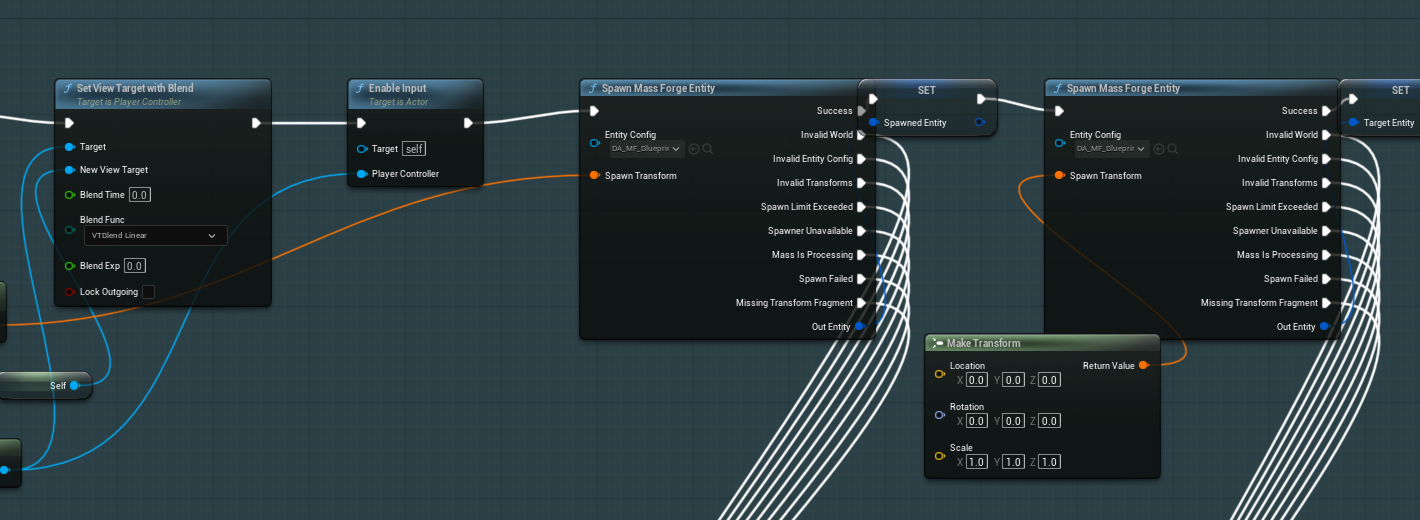
Store the complete returned handle only from Success. The example keeps source and target handles distinct and routes every failure pin to its diagnostic station outside this close-up.
The matching Destroy Mass Forge Entity node validates the complete generation and rejects Mass-processing overlap. Valid MF Entity? is a convenience predicate for UI and ordinary Blueprint flow; every gameplay operation still performs its own full validation.
In a Blueprint that receives the represented Actor:
Actor → Get Mass Forge Entity From Actor → Success execution pin
Use the returned Mass Forge Entity Handle only from the Success pin and store it only as long as needed. Other execution pins distinguish an invalid world or Actor, an Actor from another world, an unavailable representation subsystem, an ordinary unrepresented Actor, and a stale representation. The handle contains an index and serial number; every operation revalidates both, so it cannot silently target a recycled entity.
Actorless entities use exactly the same handle-based nodes. Obtain their handles from the radius/segment target-selection nodes, a project target provider, the Entity Inspector, or a Mass processor integration. Representation is not required by the attribute system.
4. Read and change Health
From the successful resolve branch:
- Call Get Mass Forge Attribute.
- Select
Vital.Healthfrom the schema-backed Attribute picker. - Use the Success execution pin and display the returned value.
- Call Change Mass Forge Attribute with
Addand-10. - Branch on
Result; on success, useOld Value,New Value, andWas Clampedfrom the returned change structure.
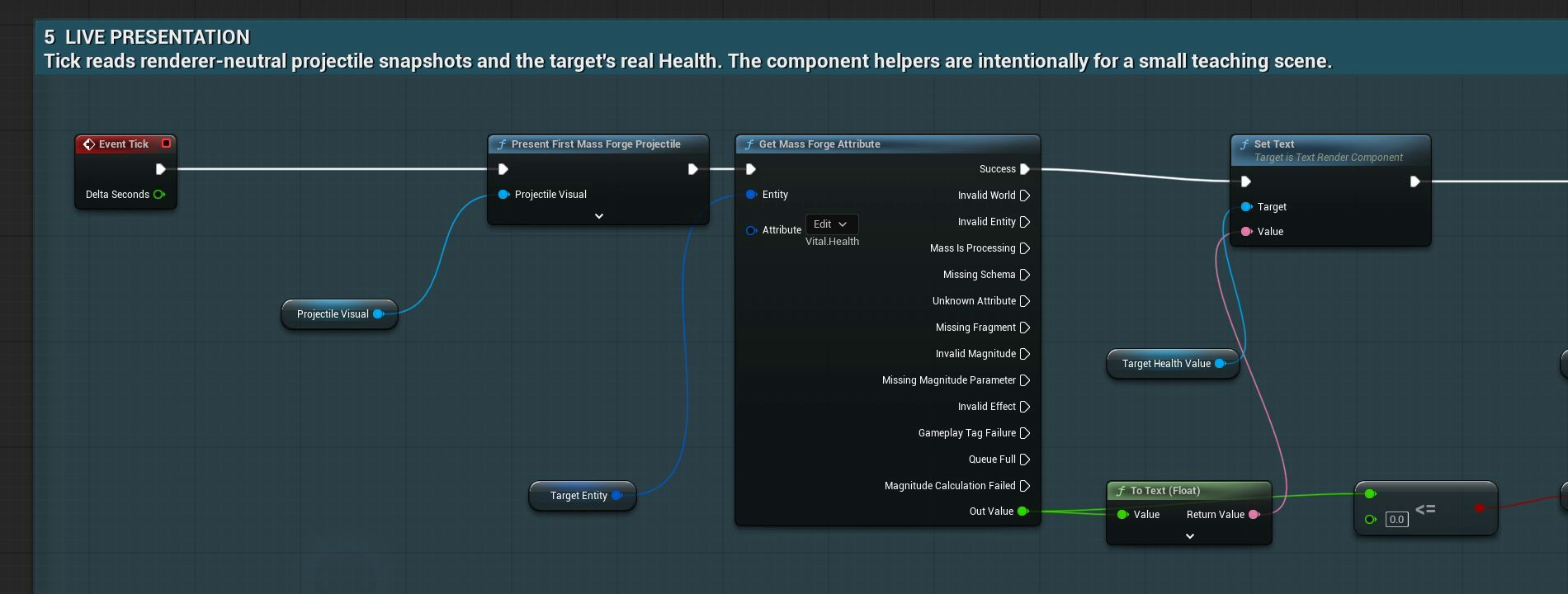
The shipped teaching graph reads the entity's real Health and writes it to the visible label. It does not maintain a second UI-owned Health variable; failed reads take an explicit non-success execution path.
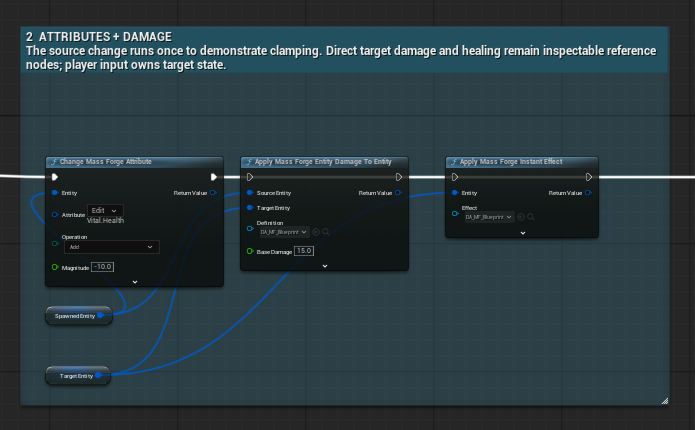
This compact teaching chain places the three common operations side by side. In production, branch on each returned result and use the queued or async form whenever execution may overlap Mass processing.
The direct change is appropriate only while the Mass entity manager is idle. A successful change obeys the schema bounds, so Health cannot pass a configured minimum or maximum.
Direct versus queued
Use a direct node only at a lifecycle point where Mass is known to be idle. From callbacks, timers, asynchronous work, or uncertain execution contexts, use the matching queued/async node and wait for its terminal result.
Production-safe queued attribute graph
Use the queued node from timers, callbacks, asynchronous gameplay, or any Blueprint path that may overlap Mass processing:
Event → Queue Mass Forge Attribute Change → Branch on Receipt.Result → Store Receipt.RequestId
Then:
- Call Get Mass Forge Attribute Subsystem.
- Bind once to On Attribute Request Completed.
- Match the callback's request ID against the stored ID.
- Inspect the completed change result before updating UI or advancing gameplay.
Queue acceptance means the request entered a bounded FIFO queue; it is not proof that execution later succeeded. The entity and attribute are revalidated at execution. Queue Full is explicit back-pressure, while stale entities and invalid attributes are reported by the completion result.
For ordinary Blueprint gameplay, Change Mass Forge Attribute (Async) performs this submission, request-ID matching, and delegate cleanup in one node while preserving the same detailed completion and rejection paths. Use the explicit queue plus subsystem delegate when several systems intentionally share a central listener.
Production-safe queued snapshot restore
After loading and migrating a project-owned save snapshot, use the direct Restore Mass Forge Attribute Snapshot node only at a guaranteed Mass-idle lifecycle point. Otherwise:
Load/Migrate → Queue Mass Forge Attribute Snapshot Restore → Branch on Receipt.Validation.Result → Store Receipt.RequestId
Bind once to On Attribute Snapshot Restore Request Completed on Get Mass Forge Attribute Subsystem, match the positive request ID, then branch on Completion.Restore.Result. Rejected submissions have ID 0 and no later event. An accepted request owns a copy of the snapshot, revalidates the exact entity generation and schema at execution, commits all values or none, publishes its attribute changes, and finally emits one completion.
Snapshot restores run before queued raw attribute changes in the first coordinator phase. This makes the saved snapshot the base state; a same-tick queued gameplay change is applied afterward. See PERSISTENCE_GUIDE.md for migrations, version diagnostics, and save-scope limits.
For a stable checkpoint that must also preserve exact counted tags, ability grants, cooldowns, charges, regeneration timing, active Persistent Effects, and active cast/channel phase, use Capture Mass Forge Entity State and Restore Mass Forge Entity State. In timing-sensitive graphs, use Queue Mass Forge Entity State Restore, store its positive request ID, then match On Entity State Restore Completed on Get Mass Forge Entity State Subsystem. Format 4 gives restored effects and lifecycles fresh world-local handles. When an active lifecycle targets another entity, store a project-owned stable relationship key with Capture Mass Forge Entity State with Lifecycle Target Reference, recreate both entities, then use Restore Mass Forge Entity State with Lifecycle Target or Queue Mass Forge Entity State Restore with Lifecycle Target with the same key and the new target handle. Never save the old Mass handle. Formats 1–3 remain readable under their documented boundaries. See ENTITY_STATE_PERSISTENCE_GUIDE.md.
Deterministic player-to-Mass damage
Author the Damage Definition
- Create Miscellaneous > Data Asset > Mass Forge Damage Definition.
- Set a stable
Damage Id, for exampleDamage.Player.Primary. - Select
Vital.Healthas Health Attribute. - Optionally enable Shield, source Power, mitigation, criticals, tag gates, a death tag, and one of the three post-death policies.
- Save the asset and resolve every validation error shown in its authoring overview.
For an ordinary player Actor damaging a Mass target, call Apply Mass Forge Actor Damage To Entity. Supply the player Actor, target handle, definition, and non-negative base damage. The convenience node places the player in the effect context and resolves a source entity automatically if that Actor represents one.
Damage receives both source and target handles; healing and reusable resource changes enter through an authored Instant Effect. The nearby direct attribute node is intentionally a lower-level stat operation, not a replacement damage formula.
Always inspect the returned Mass Forge Damage Application Result. Success includes the resolved formula stages, Health/Shield before and after, overkill, critical state, atomic transaction, kill state, and death-handling scheduling result. A failed result makes no partial Health, Shield, or death-tag commit.
Queued damage graph
When the call may overlap Mass processing, build a Mass Forge Damage Request and use Queue Mass Forge Damage:
- set
Target Entityto the generation-checked target; - leave
Source Entityunset for an ordinary player unless the formula samples source attributes; - set
Context.Source Actorto the player; - set Base Damage and the optional penetration, critical roll, and shield-bypass values;
- store the accepted request ID and match it in On Damage Request Completed from Get Mass Forge Damage Subsystem.
If the definition samples source attributes, an ordinary Actor is insufficient because it has no Mass Forge attribute fragments. Represent the player as a Mass entity or author a definition that does not require source attributes.
Apply Mass Forge Damage (Async) is the low-ceremony production form of the same queue contract. It returns only the matching request's complete damage application and keeps submission rejection separate from execution completion.
Healing and resource restoration
Healing is an Instant Effect, not negative damage.
- Create a Mass Forge Instant Effect with an ID such as
Effect.Heal.Small. - Add one attribute modifier:
Vital.Health, operationAdd, magnitude25. - Save and validate the effect.
- Call Apply Mass Forge Instant Effect with the target handle.
The Vital schema clamps the result to the authored Health maximum. A Mana restore uses the same recipe with Support.Mana. Several modifiers can be placed in one Instant Effect; the complete attribute/tag transaction succeeds atomically or changes nothing.
Use Queue Mass Forge Instant Effect on overlap-prone paths. Match its request ID in On Instant Effect Request Completed and inspect the full result. Do not replace healing with Change Mass Forge Attribute when the operation needs source context, tags, several atomic modifiers, or reusable designer-authored data.
For a local Blueprint flow, Apply Mass Forge Instant Effect (Async) performs that correlation automatically.
One Blueprint-authored self-heal ability
Create Ability.SelfHeal as a Mass Forge Ability:
- Keep Execution Type set to
Instant. - Add
Support.Manawith amount10under Costs. - Add
Effect.Heal.Smallunder Self Effects. - Set Cooldown Seconds to the desired value, for example
5. - Leave Requires Target disabled.
- Add the ability to Starting Abilities on the generated Mass Forge Ability Trait, or call Grant Mass Forge Ability at runtime.
The minimal activation graph is:
Entity Handle → Can Activate Mass Forge Ability → inspect Result → Activate Mass Forge Ability
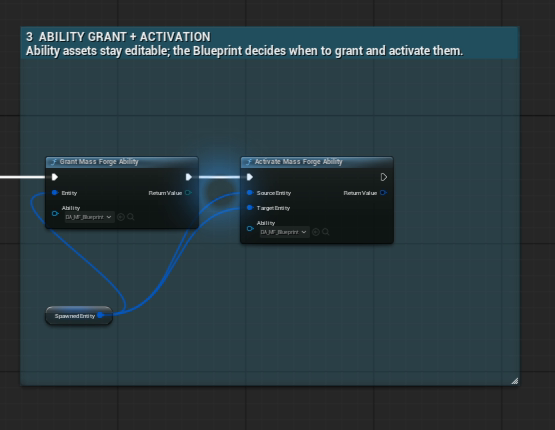
Granting controls runtime ownership; activation performs the ability's validated costs, cooldowns, tags, effects, and lifecycle. Add Can Activate Mass Forge Ability before activation when UI or AI must explain a rejection without changing state.
Pass an unset target handle for this self-only ability. The same graph works for actorless and represented Mass entities. No presentation listener is required.
For production callbacks, use Queue Mass Forge Ability Activation, store its accepted request ID, and match On Ability Operation Request Completed from Get Mass Forge Ability Subsystem. Costs, cooldown, tags, self effects, target effects, and persistent outcomes commit as one validated transaction; a later failure rolls the provisional state back. The older On Ability Request Completed event remains an activation-only compatibility event.
Runtime ownership and lifecycle control use the same production pattern. Queue Mass Forge Ability Grant, Queue Mass Forge Ability Revocation, Queue Active Mass Forge Ability Cancellation, and Queue Active Mass Forge Ability Interruption all return the same receipt and complete through On Ability Operation Request Completed. Grant/Revoke/Activate/Cancel/Interrupt share one bounded FIFO, so caller order is preserved. Queued cancellation and interruption capture the current lifecycle ID; if that lifecycle ends or is replaced before execution, the completion explicitly reports No Active Ability or Lifecycle Changed and leaves the replacement untouched. Represented Actors can use Queue Active Mass Forge Ability Cancellation from Actor and Queue Active Mass Forge Ability Interruption from Actor.
For ordinary local graphs, use Grant Mass Forge Ability (Async), Revoke Mass Forge Ability (Async), and Activate Mass Forge Ability (Async). They expose the same structured operation completion without a manually stored request ID.
Visible Mass-owned projectile
Use Launch Mass Forge Entity Projectile when both source and target are Mass entities and the projectile config already owns its optional Damage Definition. Supply the exact source and target handles, start/target locations, and speed. Damage is not applied on launch: the Mass projectile travels first, resolves at impact, and only then enqueues its authored damage.
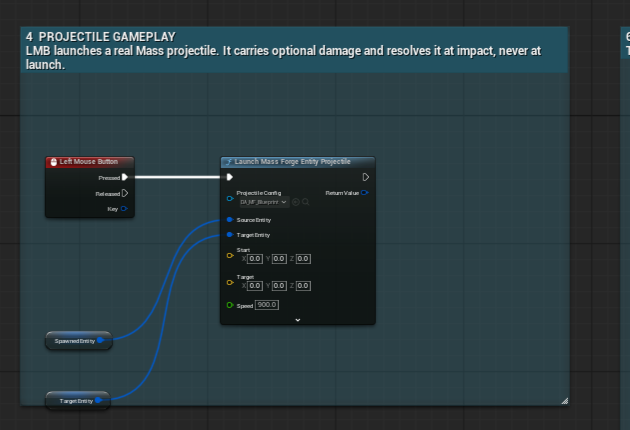
This is the shipped Quick Start graph. Presentation reads Mass Forge projectile snapshots; authority remains in the projectile entity and its impact result, so replacing the visual renderer does not change combat.
Use Launch Mass Forge Projectile (Async) when the local Blueprint must await the exact terminal impact/expiry result. Use Get Mass Forge Projectile Snapshots to feed a project-owned Niagara system, HISM renderer, pooled Actor layer, or debugging visual.
Mass-to-player and player-to-Mass adapters
An ordinary player Actor deliberately keeps its project-owned health, GAS, inventory, and replication model. To receive Mass-authored effects without becoming a Mass entity:
- Add Mass Forge Effect Receiver Component to the player Blueprint.
- Bind On Effect Received.
- Translate the supplied Instant Effect and fully resolved context into the player's own gameplay system.
- Call Apply Mass Forge Entity-to-Actor Effect from the Mass source handle to the player.
For the reverse direction, call Apply Mass Forge Actor-to-Entity Effect or the richer Apply Mass Forge Actor Damage To Entity node. Use the Damage Definition when the Mass target needs the shared damage formula; use an Instant Effect for a direct authored transaction such as healing, resource restoration, or a fixed attribute/tag change.
The generic dispatch order is represented Mass entity first, Actor interface second, then exactly one receiver component. The receipt reports the selected route, resolved source/target context, receiver object, and exact rejection reason. It never guesses between multiple receiver components and never casts to a sample player class.
Multiplayer scope
Multiplayer is intentionally outside the supported initial-release workflow and no multiplayer example is included in the public launcher. Keep the Blueprint Quick Start local and authoritative. Networking source and an advanced reference remain in the plugin for evaluation, but their integration surface is experimental for this release and is not part of the advertised onboarding or support promise.
Common Blueprint node index
| Goal | Recommended node |
|---|---|
| Spawn one placed actorless entity | Spawn Mass Forge Entity |
| Spawn a bounded transform batch | Spawn Mass Forge Entities |
| Validate or destroy a handle | Valid MF Entity? / Destroy Mass Forge Entity |
| Resolve a represented entity | Get Mass Forge Entity From Actor |
| Read one stat | Get Mass Forge Attribute |
| Set, add, or multiply one stat | Change Mass Forge Attribute or Queue Mass Forge Attribute Change |
| Await one safe stat mutation | Change Mass Forge Attribute (Async) |
| Restore saved attribute state | Restore Mass Forge Attribute Snapshot or Queue Mass Forge Attribute Snapshot Restore |
| Restore a durable combat checkpoint | Restore Mass Forge Entity State or Queue Mass Forge Entity State Restore |
| Capture a targeted active cast/channel | Capture Mass Forge Entity State with Lifecycle Target Reference |
| Restore a targeted active cast/channel | Restore Mass Forge Entity State with Lifecycle Target or Queue Mass Forge Entity State Restore with Lifecycle Target |
| Apply one reusable atomic effect | Apply Mass Forge Instant Effect or Queue Mass Forge Instant Effect |
| Await one reusable atomic effect | Apply Mass Forge Instant Effect (Async) |
| Await one complete damage transaction | Apply Mass Forge Damage (Async) |
| Grant an ability | Grant Mass Forge Ability or Queue Mass Forge Ability Grant |
| Revoke an ability | Revoke Mass Forge Ability or Queue Mass Forge Ability Revocation |
| Check an ability without side effects | Can Activate Mass Forge Ability |
| Activate an ability | Activate Mass Forge Ability or Queue Mass Forge Ability Activation |
| Await ability grant/revoke/activation | Corresponding (Async) ability node |
| Cancel an active cast/channel | Cancel Active Mass Forge Ability or Queue Active Mass Forge Ability Cancellation |
| Interrupt an active cast/channel | Interrupt Active Mass Forge Ability or Queue Active Mass Forge Ability Interruption |
| Remove an active timed/infinite effect | Remove Mass Forge Persistent Effect using its returned handle |
| Launch and await real projectile impact | Launch Mass Forge Projectile (Async) |
| Launch a common entity projectile without constructing nested structs | Launch Mass Forge Entity Projectile |
| Render Mass-owned projectiles | Get Mass Forge Projectile Snapshots into Niagara, HISM, or an Actor pool |
The subsystem getter nodes expose typed completion and lifecycle events when a queued operation or ongoing ability must be observed. Prefer the convenience library nodes for ordinary calls; use the subsystem directly for event binding and advanced orchestration.
Verification before building gameplay on top
- Open Tools > Mass Forge Project Health and resolve every error.
- Open Tools > Debug > Mass Forge Entity Inspector and confirm the live entity's Health, Mana, granted ability, cooldown, tags, and active effects.
- Test the direct graph from a known Mass-idle path.
- Test the queued graph and prove the request ID reaches exactly one matching completion.
- Exercise invalid, stale, queue-full, insufficient-resource, cooldown, and dead-target branches rather than handling only success.
- Run Unreal content validation after changing schemas or gameplay assets.
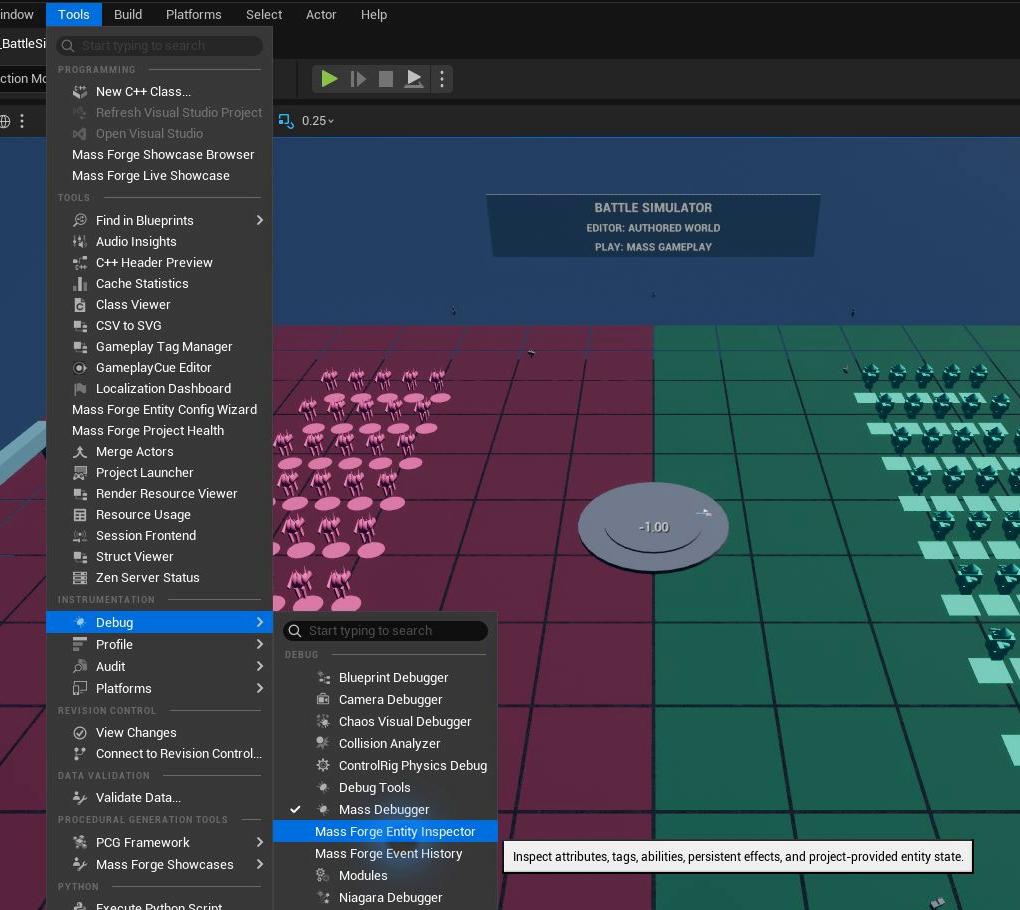
In Unreal Engine 5.8, both diagnostic tabs live under Tools > Debug. Open the Entity Inspector after Play begins so it can attach to the active world.
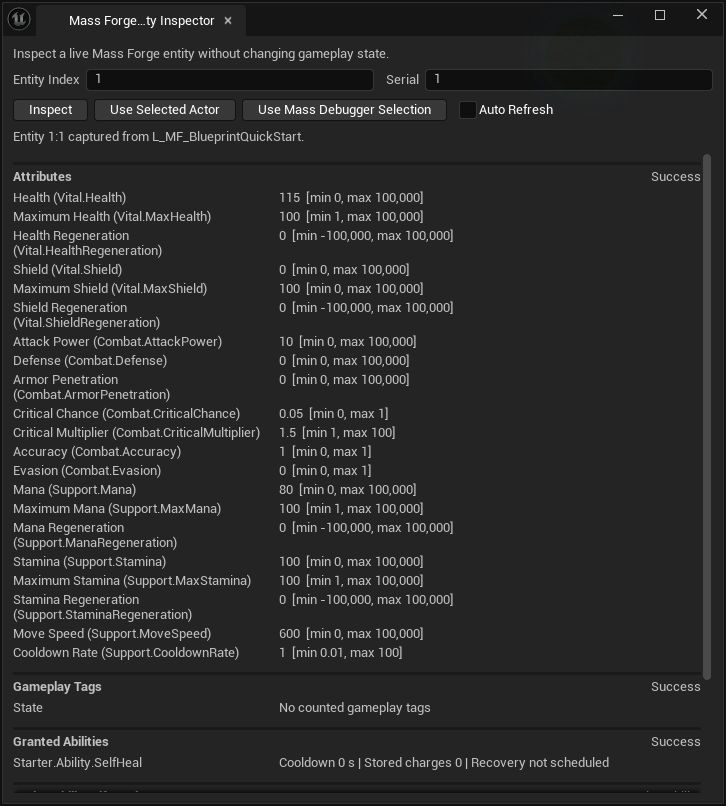
Select an entity through the Mass Debugger or enter its complete index and serial, then press Inspect. The panel reads Mass Forge state without changing it.
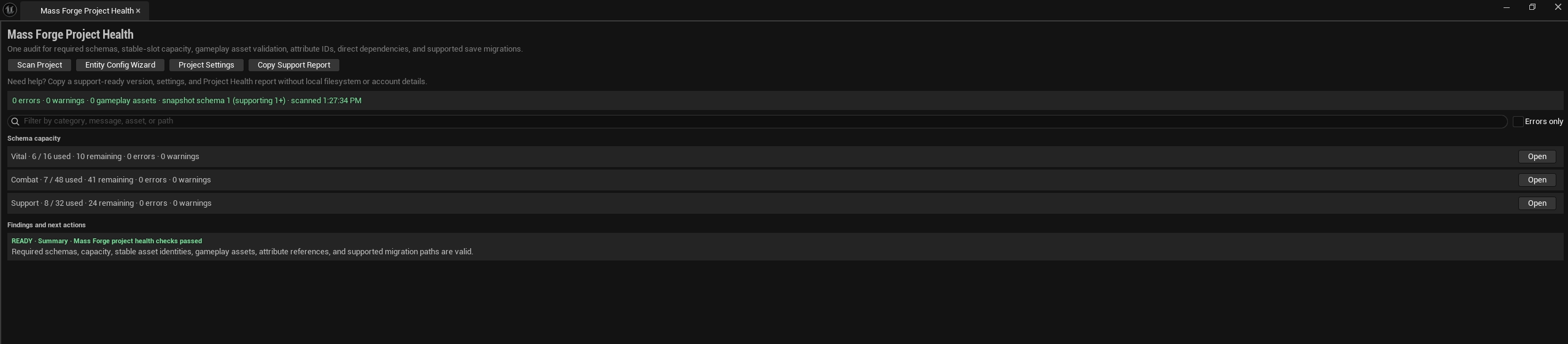
Project Health audits project-owned content and schema configuration before runtime testing. A green summary is the baseline; it does not replace exercising failure branches in the project's actual gameplay map.
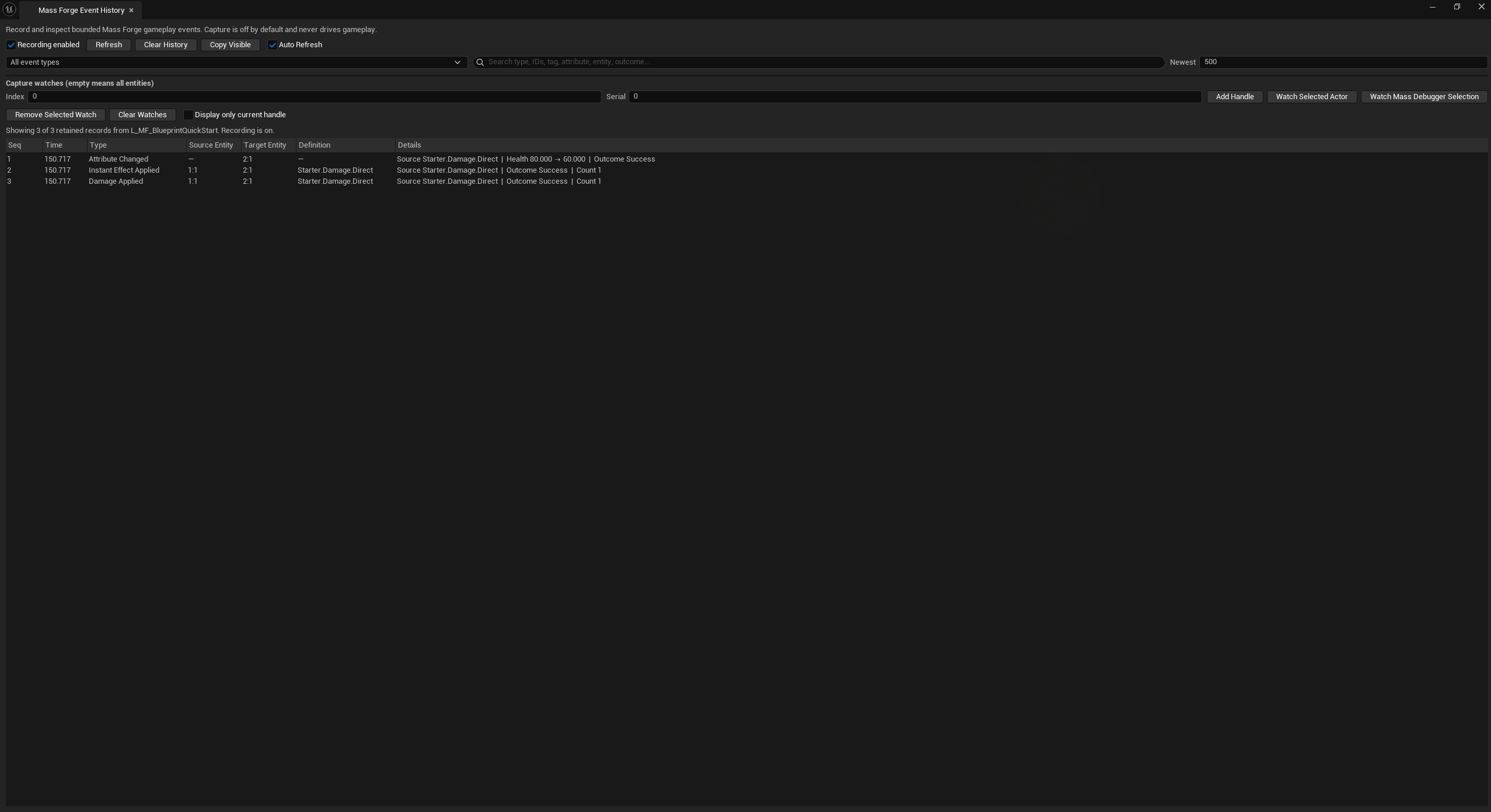
Event History is an observation tool. Here one impact produced the expected attribute, effect, and damage records, making the input-to-impact-to-state-change chain inspectable without driving gameplay from the editor window.
Mass Forge's automation suite constructs real Blueprint pins for the public libraries and exercises real Mass worlds for attribute queues, atomic effects, damage, abilities, Actor receivers, stale handles, back-pressure, and callback re-entry. Project-specific graphs still need a playtest because their spawning, representation, player state, networking, and presentation remain project-owned.
Continue with Blueprint Async Actions, the Blueprint authoring guide, damage system guide, combat integration guide, abilities guide, and deferred command contract for the complete behavior behind these starter graphs.